
Salesforce Spring 20 – The Top 5 Features to Deploy in your Company Today
As with most Salesforce releases, the Spring 20 release which came out for most Salesforce users last week is full of some great new enhancements and features to the system. In this article we will highlight a few of the items we think will be most useful to Asset Managers and Financial Services companies. If you would like more insight into these updates and how to implement them please feel free to contact us at info@finservconsulting.com or by completing our Salesforce inquiry form

# – 1. Lightning Extensions for Google Chrome Browser
Click here to access extension for Google Chrome
This first feature applies to anyone who uses the Google Chrome Browser only. Now you can install a Google Extension called the Lightning Extension that provides 3 new features. The most useful of these new features is the Component Customization feature which will allow your users to toggle on and off sections of their Page Layout. If there is a section that is never used or if the user wants a streamlined view, they can now quickly make any section invisible on their screen and can toggle it back on if needed.
A great example is in the Account Barbary Coast Wireless — we often want to see the latest activity with the client but the File section is taking up the screen so the user can’t quickly see that section right away.
Account Page before enabling new Component Customization
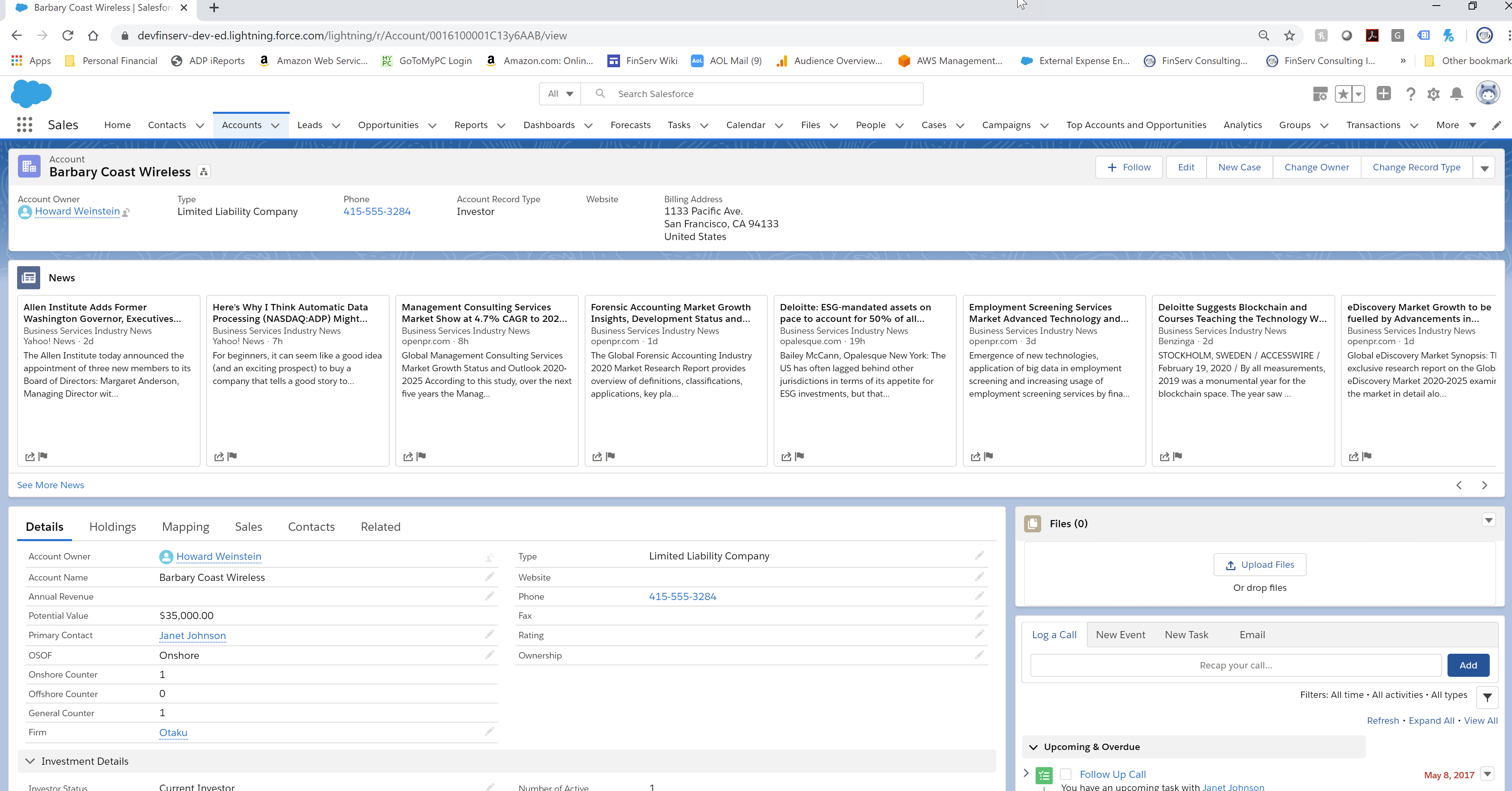
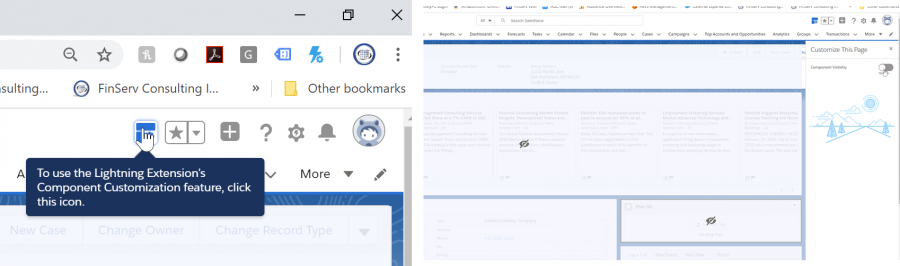
By quickly using the new feature, you see which sections will be hidden (see how its done below)
When you click on the Component Icon the screen will grey out and you will see the components and you can select as shown in the screenshots which ones you have chosen to hide
There are two other less impactful features in this release. One is Dark Mode which is meant to be easier on the eyes when working at night, for instance, and renders the background black. The second is Linkgrabber, which opens every single link you click on in a single browser tab, similar to how the Sales Console works for people who like that feature.
#2 – Lightning App Builder for Mobile
Salesforce has started to push out a real difference maker with their Mobile application, which is increasing the functionality gap between Salesforce and other industry CRM’s like Backstop and Clienteer. For those who have become used to the Lightning Page Builder for the desktop, you will be overjoyed to know that the Page Builder for the Mobile Device has now become General Availability. You can now drag and drop and setup the layout of your pages for your Mobile Device as easy as you would on a desktop. The cherry on top with this feature is the ability to differentiate the layout by device so for smartphones with limited space you can intelligently decide which layouts and features are included in your page setup.
The familiar App Builder with the New Form factor Option to Customize the Layout for any Smart Phone
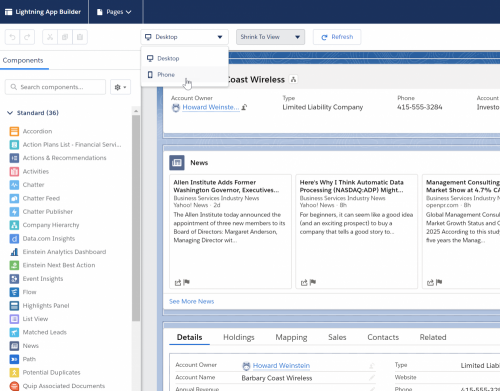
With the new Phone view you get to see the dynamic layout that the user sees on their smartphone.
You can see that the layout is automatically adapted to your phone screen’s dimensions providing a fully responsive experience that Backstop and Clienteer can’t even dream about.
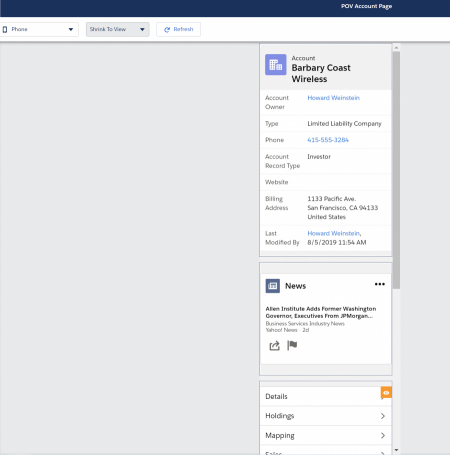
The Filter by Device lets you decide not to show certain components like graphs that may be too big to effectively be viewed on a mobile device.
The below screenshot shows the intuitive and easy to use filter to exclude large components from the phone options

#3 – Email Integration / Opt Out Shown Right in Sidebar
For those who are extensive users of the Lightning Salesforce plugin for Outlook and Gmail, you will love the new feature which highlights when a contact has opted out of emails right in the Salesforce Outlook sidebar.
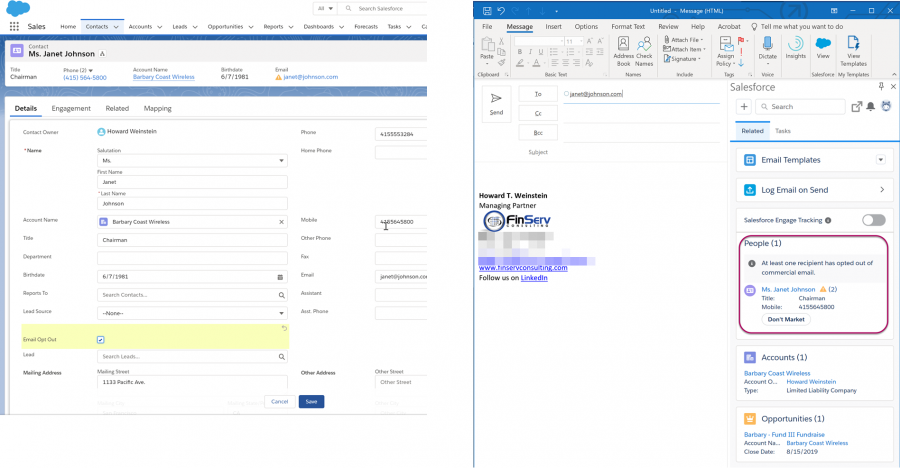
In the before screenshot below you see Janet Johnson’s contact info showing under People

The first screenshot below shows Janet’s contact record which is updated in Salesforce to indicate that she has opted out of email. You can see in the 2nd screen shot the resulting clear warning — anyone who tries to write Janet an email will see that she has opted out of email. This keeps sensitive investors and investor representatives from getting upset with your sales and marketing teams!
#4 – Report Filtering by Other Fields on the Report
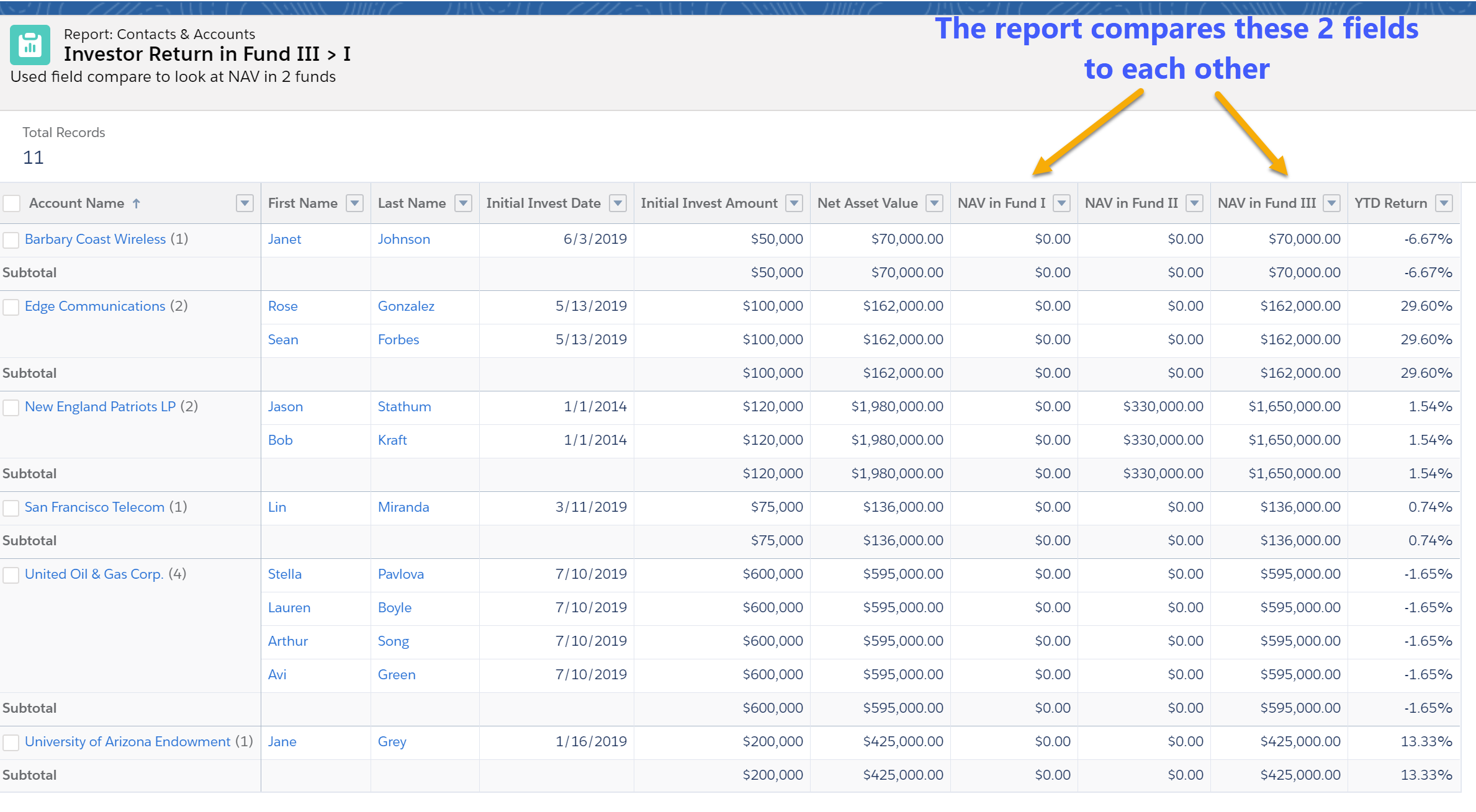
The Spring 20 release has several new features in Reporting. Once of the most useful additions is the ability to add filters to the report that compares other fields on the report.
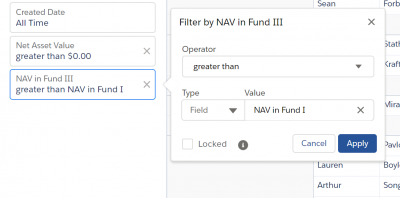
For example, this can come in very handy if you wanted to compare an Investor’s NAV in an older fund vs. their NAV in a current fund. In my example, the fund has 3 funds and I filtered on the Investor’s whose NAV in Fund III is greater than their NAV in Fund I. The original report had 17 Records but this filtered report just shows the 11 Investors who meet the refined criteria.
The screenshot below shows the user friendly filter screen with the new option to choose the filter type of Field instead of a literal value
#5 – URL Links with Prepopulated Values (not for mobile app)
This next item is one of those features advanced users loved in Classic that was lost in Lightning during the transition. Thankfully, Salesforce has been working diligently to bring back the most popular features to Lightning as Classic is very close to its end of life.
This feature allows you to create a URL link that includes prepopulated values for any field in the object, which will save time when creating a new record. For instance, if your Sales and Marketing teams are at an Investor roadshow and they are meeting new Investors, they will want to create new Contacts quickly since there are often many fields that are always the same entry in a Contact. By creating a clickable URL link to start the new Contact from the Account Page for the Investor, the new Contact can be prepopulated with as many of the fields as you want. Some of these may be placeholder values, while others are real values that never change but previously had to be manually entered or selected.
The syntax to set this up is a bit tricky so we recommend you seek help from us or your IT department if you are not experienced in HTML as you need to create a query string and place the field name and the value you want entered separated by a comma. You use lightning/pageReferenceUtils module to build navigation links that prepopulate a records’ create page with default field values. Prepopulated values can accelerate data entry, improve data consistency, and otherwise make the process of creating a record easier.
How: To construct a custom button or link that launches a new record with prepopulated field values, use this sample formula:
/lightning/o/Account/new?defaultFieldValues=
Name={!URLENCODE(Account.Name)},
OwnerId={!Account.OwnerId},
AccountNumber={!Account.AccountNumber},
NumberOfEmployees=35000,
CustomCheckbox__c={!IF(Account.SomeCheckbox__c, true, false)}
Link to New URL Link Description
Conclusion
As you see there are many exciting features included in Salesforce’s Spring 20 release. FinServ Consulting, a top Salesforce Partner with a focus on the Asset Management sector, ensures our clients take advantage of the most important features and maximize their investment in Salesforce.
If you are interested in any of these features and want help implementing them or just have a question about them, please contact us here or by email at info@finservconsulting.com and we would be happy to help.
About FinServ Consulting
FinServ Consulting is an independent experienced provider of business consulting, systems development, and integration services to alternative asset managers, global banks and their service providers. Founded in 2005, FinServ delivers customized world-class business and IT consulting services for the front, middle and back office, providing managers with optimal and first-class operating environments to support all investment styles and future asset growth. The FinServ team brings a wealth of experience from working with the largest and most complex asset management firms and global banks in the world.

Preparing for Salesforce Blockchain
Salesforce Blockchain was only announced in May 2019 and at Dreamforce 2019, it was announced that Lamborghini, the premier maker of exotic super cars, was using Salesforce Blockchain to authenticate its previously owned (aka heritage) cars. Lamborghini represents yet another major early adopter of Salesforce Blockchain in a short amount of time since its release. Salesforce Blockchain will not be available to the general public until 2020 and it already has been rapidly implemented by early adopters such as Arizona State University, IQVIA, S&P Global Ratings and now, Lamborghini to gather and share massive amounts of data with an expanding and increasingly complex network of partners and third parties.
What is Salesforce Blockchain?
To define Salesforce Blockchain properly, we must look at what Blockchain is overall and its underlying components. Blockchain is a distributed decentralized digital ledger spread across a network of computers securely storing transactional data. Core features include:
- Distributed Decentralized Digital Ledger – the digital ledger stores transactions such as the transfer of funds across a network of computers rather than a central source
- Peer to Peer Network – the network is comprised of a partner network (only accessible to members) who all save and maintain the transactional data
- Data Verification – data is verified using cryptography and digital signatures to authenticate identities and transactions
Salesforce Blockchain takes all of the interconnected and complex components of Blockchain and makes it accessible to the general users. It is a low code platform built on Lightning and open source Blockchain technology from Hyperledger Sawtooth. It is designed to make building and managing trusted partner networks, workflows and contracts possible with clicks and not code.

“Blockchain is changing the way companies approach trust and transparency,” said Adam Caplan, SVP, Emerging Technology, Salesforce. “Lamborghini is a perfect example of this—we’re excited to see how such an iconic brand is able to innovate and transform the vintage car market with a cutting edge technology like Salesforce Blockchain.”
Per Salesforce’s News Release, Salesforce makes Blockchain more accessible and even more powerful through the following:
- Build Networks with Clicks — Drag and drop ready-to-use modules to build their own blockchain networks with minimal need for writing code.
- Automate Data with Lightning Platform — Make blockchain data actionable through native integration with Salesforce. Layer complex blockchain data on top of existing sales, service or marketing workflows like search queries and process automation. Even more, companies can now run Einstein-powered artificial intelligence algorithms that integrate blockchain data into sales forecasts, predictions and more.
- Engage Partners Easily—Lower the barrier to entry for partners, distributors and intermediaries to leverage Salesforce Blockchain. Companies can now pull in APIs, pre-built apps and integrate any existing blockchains with Salesforce. With an intuitive engagement layer, companies can also easily interact with and add third parties to their blockchain with a few clicks and a simple authentication—creating trust networks.
Lamborghini Salesforce Blockchain Usage
Lamborghini recognized the benefits of Blockchain and how Salesforce enabled them to achieve those desired Blockchain benefits. Using Salesforce Blockchain, they took on the challenge to improve their heritage cars certification process. Heritage cars are previously owned cars that when resold, must go through an extensive and exhaustive process to certify that the car is 100% Lamborghini.
“When a Lamborghini is resold, the vehicle often goes through 800 to 1,000 certification checks that take place at the Lamborghini headquarters in Sant’Agata Bolognese, Italy,” according to a press release published by Salesforce.
The certification process requires that Lamborghini coordinate a vast network of participants – technicians, repair shops, dealerships and more – to verify the provenance and authenticity of the vehicle. To improve the speed and efficiency of the certification process, Lamborghini digitized the process by creating a trusted network among the certification process participants in Salesforce Blockchain.
“Innovation has been at the core of our company since its founding,” said Paolo Gabrielli, Head of After Sales at Automobili Lamborghini. “Salesforce Blockchain will allow us to take our innovation a step further, accelerating the authenticity of our heritage vehicles faster than ever.”
In addition to speeding up the certification process, Salesforce Blockchain has layered on the inherent security of Blockchain into the process. All authentication checks are managed by Lamborghini and its trusted partner network where each partner in the Blockchain has access to the entire database behind the car from parts, service, history and verifications. Full data transparency with decentralized data renders counterfeiting practically impossible.
Usage in the Alternative Asset Management Industry
The quality of early design partners and what Lamborghini has been able to do with Salesforce Blockchain has shown that Salesforce Blockchain is a powerful product that will have practical application to any number of organizations, especially alternative asset managers.
Consider the following questions outlined by Salesforce to think about the potential use case of Blockchain at your organization. (https://www.salesforce.com/blog/2019/05/what-is-blockchain-technology.html)
- Do you want to solve a business problem, rather than an integration problem? Blockchain is at times mistakenly positioned as an integration technology, but that’s not a core strength. If integration’s your goal, you may be better off using an API, Enterprise Service Bus (ESB), or web service.
- Does your business process require inherent irreversibility? This quality is foundational to blockchain, so ask yourself whether it would help you achieve your business objective or hinder it.
- Do you want to transfer objects of value from one party or entity to another? If this is the case, consider whether what you intend to do will benefit from immutability. Also, does it require consensus? If the answer is “yes,” you might benefit from using blockchain.
- Do you want to transfer information across organizational boundaries? If your use case involves some level of managing cross-organizational trust, deploying blockchain can help. It can also be useful if you want to simplify the process between you and upstream or downstream business partners.
- Do you want to target an ecosystem, rather than a few parties? Consider whether the problem you want to solve requires (significantly) more than two participants. If it is just a handful, integration might be the way to go. If you are targeting an ecosystem, blockchain may be the right choice.
- Do you have a clear strategy for engaging and driving adoption with partners? Without their adoption of blockchain, the positive impact to your business will be limited.
With the above questions in mind, a high impact and practical usage of Salesforce Blockchain could be in streamlining the Investor Onboarding process, typically a laborious and inefficient process bound by repetitive tasks and adhering to rules and regulations such as:
- KYC (Know Your Client) Verification – working with multiple parties to review and verify specific pieces of data such as proof of identity, source of funds, legal structure, sanction and watch list screening, etc.
- Client Suitability Verification – working with clients to confirm their suitability for investing in a fund under FINRA Rule 2111 or MiFID II guidelines (i.e. investments are in line with their risk tolerance and ability to bear losses). As client situations can change, investment suitability must be continually reassessed
Bringing the KYC and Client Suitability Verification process into Salesforce Blockchain expedites the process by bringing all parties and the associated reviews together in one trusted network. Once the data is in one network, it can be shared with Salesforce CRM enabling process automation and AI insights into the process. In addition, it also enables a fully transparent review process that is inherently auditable.
Summary
Salesforce Blockchain is a major focus of Salesforce to enable their clients to easily avail themselves of this paradigm changing technology. Salesforce believes in clicks, not code and has brought this model to Blockchain. For the early adopters of Salesforce Blockchain such as Lamborghini, Salesforce Blockchain has shown itself to be an indispensable feature of Salesforce. To prepare for Blockchain, FinServ can help in mapping out your current processes and planning out what can be put into Blockchain. If you would like help with planning or implementing this, or just get more info or a demo on these features, FinServ would love to help. You can reach us at info@finservconsulting.com or give us a call (646) 603-3799.
About FinServ Consulting
FinServ Consulting is an independent experienced provider of business consulting, systems development, and integration services to alternative asset managers, global banks and their service providers. Founded in 2005, FinServ delivers customized world-class business and IT consulting services for the front, middle and back office, providing managers with optimal and first-class operating environments to support all investment styles and future asset growth. The FinServ team brings a wealth of experience from working with the largest and most complex asset management firms and global banks in the world.
What You Need To Know About Uncleared Margin Rules (UMR)
Regulation around UMR came about as a response to the financial crisis of 2008-2009. One of the reforms that was recommended was the implementation of margin requirements for non-centrally cleared derivatives. The in-scope OTC derivatives include FX options, NDFs, physical FX forwards, swaptions and hedging trades.
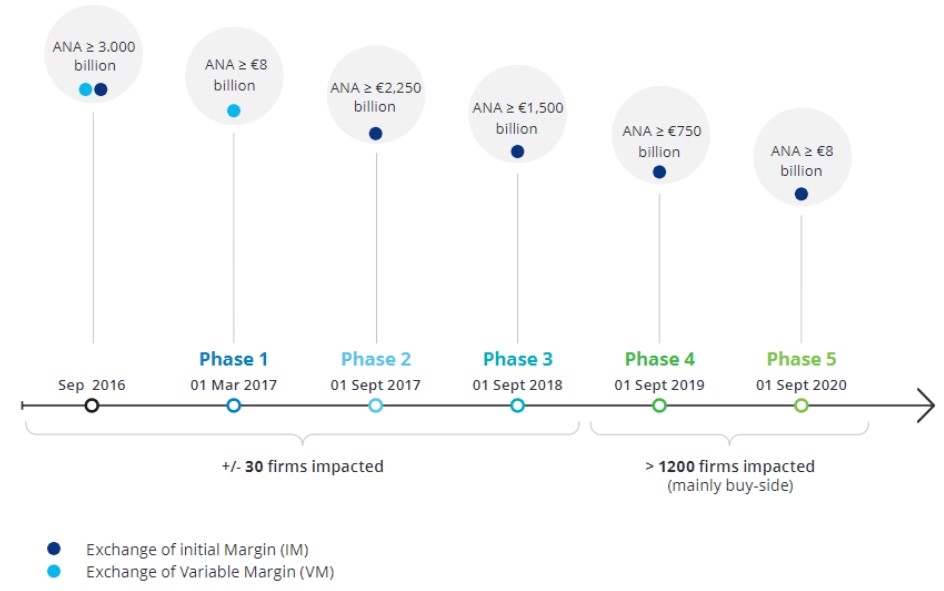
The initial implementation of Variation Margin (VM) requirements was implemented in 2017, while Initial Margin (IM) requirements continue to be phased in until 2021. The new IM rules that are to be put into effect in 2020 and 2021 affect primarily smaller financial organizations, including buy-side participants. Note that UMR has been phased in since September 2016 in the US and March 2017 for remaining market participants.
The initial Phases affected the interdealer market and required execution/negotiation of new CSAs, custodial arrangements, eligible collateral schedules and account control agreements with counterparties/custodians.
The upcoming Phases will affect smaller insurance/banking groups and asset managers, who naturally have less experience with the new rule requirements and likely, fewer resources to help with implementation.
Unlike variation margin, which is based on the market value of trades, initial margin is a risk-based calculation. VM also happens to be a mature concept for most firms; IM, though, is new for most institutional investors because it includes custodians in addition to the trading parties.
Key Dates
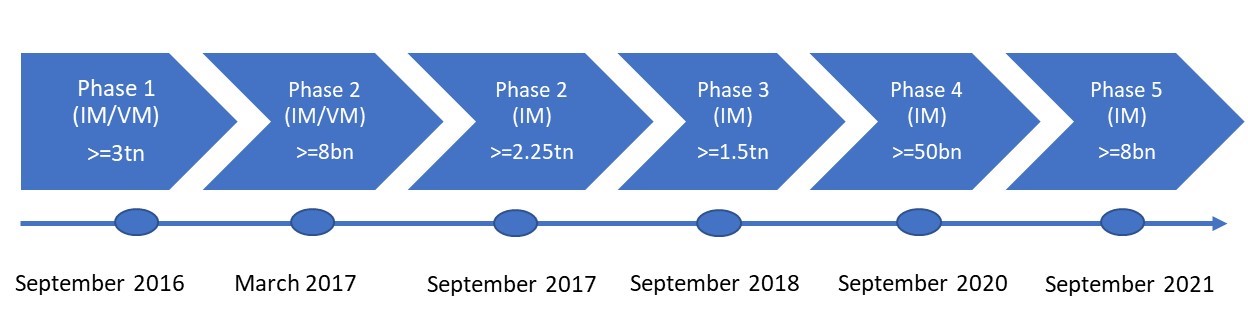
Adherence to UMR has been on a phased approach thus far; in 2018, market regulators postponed the last two Phases (4 and 5) by one year. The Phase 4 compliance date was originally September 2018 and was moved to September 2020. The Phase 5 compliance date moved from September 2020 to September 2021.
The phased thresholds for UMR means that, with each Phase, more and more In-Scope Counterparties will be affected and has been the source of some consternation among market participants.
In addition to the notional thresholds, IM is required to be posted between counterparties where there is a consolidated threshold of $50mn USD or $50mn EUR. Thus, if the IM threshold is less than $50mn, no IM needs to be exchanged.
Biggest Challenges
There are four main challenges for market participants when it comes to compliance with UMR:

Solutions
The IM rules consist of the following tasks that need to be completed by a market participant:
- Calculation of regulatory IM
- Collateral segregation and rehypothecation requirements
- Eligibility checks of collateral
- Settling of collateral (on T+1 basis)
- Threshold application (ie 50mn)
Because of this daunting list (many of which are operationally intensive), many participants have sought to outsource their adherence to the new guidelines.
But market solutions have been scarce; there are few all-in-one solutions; rather, a few vendors have capabilities in different facets of UMR
- There were originally two market solutions: Margin Xchange and ISDA create
- As of December 2018, neither had been released to market
- As of September 2019, Margin Xchange ended their product after regulators cut the industry workload by ~90%
- As of January 2019, ISDA create was launched and is free to the buyside
- As of September 2019, 50 firms were on ISDA create; more than 160 other firms are testing the platform ahead of Phases 4 and 5.

Here’s a list of what a ‘typical’ hedge fund needs to do:
- Assess which products are in-scope and calculate notional amounts
- See if the notional threshold is applicable or not
- See if the IM threshold is applicable or not
- Re-negotiate all Credit Support Annexes
- Calculate & Pledge IM and ensure it is held with Custodian Bank
- Ensure no rehypothecation of collateral
- Manage margin requirements: calculation, monitoring, segregation and reconciliation
Calculating IM
Calculation of IM is one of the more cumbersome requirements of the new rules. There are certain vendors who are licensed ISDA initial margin calculation service providers and can help with calculations.
Partial list of vendors who are licensed SIMM service providers
- AcadiaSoft Risk Services Suite
- Bloomberg
- Calypso
- Cassini Systems
- CME
- Clarus Financial
- Lombard Risk
- Murex
- OpenGamma
- Quantile Technologies
- TriOptima
Initial Margin (IM) has to be calculated via one of two methods : the grid method or the SIMM method.
Unfortunately, there is no clear preferred method in that both methods are operationally burdensome. Each method has its pros and cons, which will require each market participant to perform a cost benefit analysis.
Here we will list out some key points for each method.
Grid Methodology – A standardized schedule included by regulators
- Insufficient granularity of tenor buckets and product types
- The grid methodology has a lack of clear guidance from regulators and as a result, inconsistent interpretation. As a result, it hasn’t been widely adopted.
- The methodology seems simple, but results are difficult to compare between counterparties
SIMM Methodology
- Thus far, all entities that have implemented regulatory IM have used SIMM
- Takes into account offsetting risks
- Use of a standardized model allows simpler comparison of margin amounts and results in fewer disputes among participants
- Requires each counterparty to generate sensitivities for every trade – time consuming and requires huge amounts of market data
- The only regulator-approved IM model
Summary
If you are facing any of these issues in complying with the UMR rules, please reach out to FinServ. Throughout our 15 years of existence, we have proven that our deep industry knowledge combined with our project management and overall best practice methodologies can be an asset to your organization. To further continue the conversation or to discuss more of FinServ’s capabilities, please contact FinServ at info@finservconsulting.com or give us a call at (646) 603-3799.
About FinServ Consulting
FinServ Consulting is an independent experienced provider of business consulting, systems development, and integration services to alternative asset managers, global banks and their service providers. Founded in 2005, FinServ delivers customized world-class business and IT consulting services for the front, middle and back office, providing managers with optimal and first-class operating environments to support all investment styles and future asset growth. The FinServ team brings a wealth of experience from working with the largest and most complex asset management firms and global banks in the world.
Top 5 Most Exciting Features from Dreamforce 2019
As always, Dreamforce was an amazing event where Salesforce announces many exciting new features they are planning to roll out in their software over the next one to two releases. In the past few years, Lightning was the key focus area; however, this year, Salesforce made a strong pivot towards Einstein – their Artificial Intelligence (AI) platform. It is clear that integrating AI and Machine Learning into their platform has now become the main focus of where Salesforce is driving the majority of their new innovations. Therefore, it will be no surprise that many of the items on the list this year relate to Einstein features and functions.
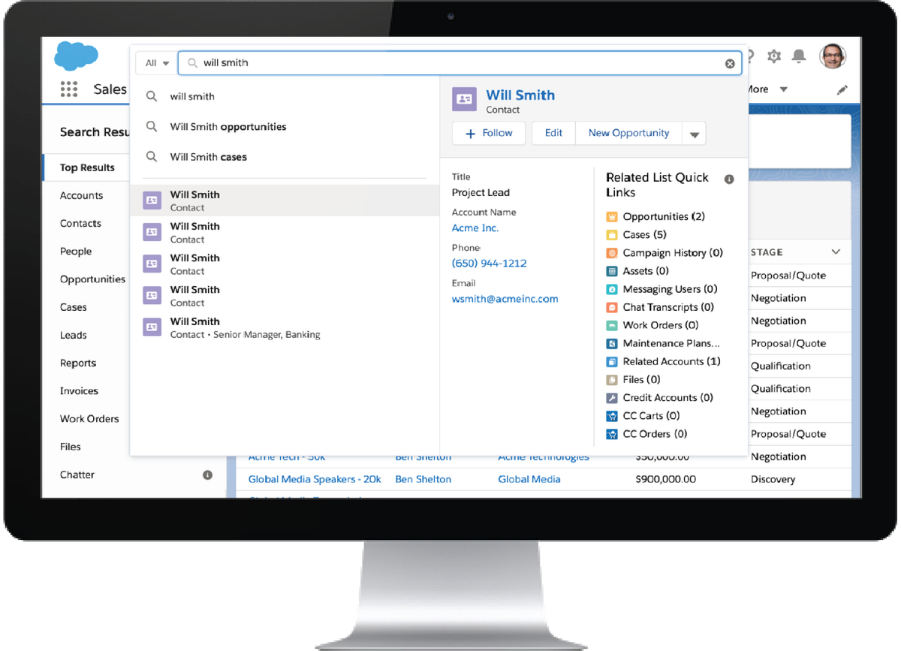
#5 – Einstein Search
Per Salesforce, they are taking the Enterprise Search function in Salesforce to a new level by making it personal, natural, and actionable. One of the most exciting aspects of Einstein Search is that it will provide a personalized search result for each user. Einstein Search leverages both Machine Learning and Data Mining techniques to produce its’ results. Another exciting enhancement to Einstein Search is the ability to use Natural Language to enter a search. I saved the best for last and certainly the most exciting feature of Einstein Search will be the actionable toolbar. This toolbar will allow you to take action on your search results right from the search bar, which will result in a 50% reduction in clicks and page loads for your most frequently-used tasks. Reducing the number of clicks is far and away the number one requirement clients ask us for, so this will be a truly powerful new feature.
Note – This personalize results feature currently requires at least 100 active Sales Cloud licenses. Salesforce is working to remove this restriction.
#4 – Einstein Voice
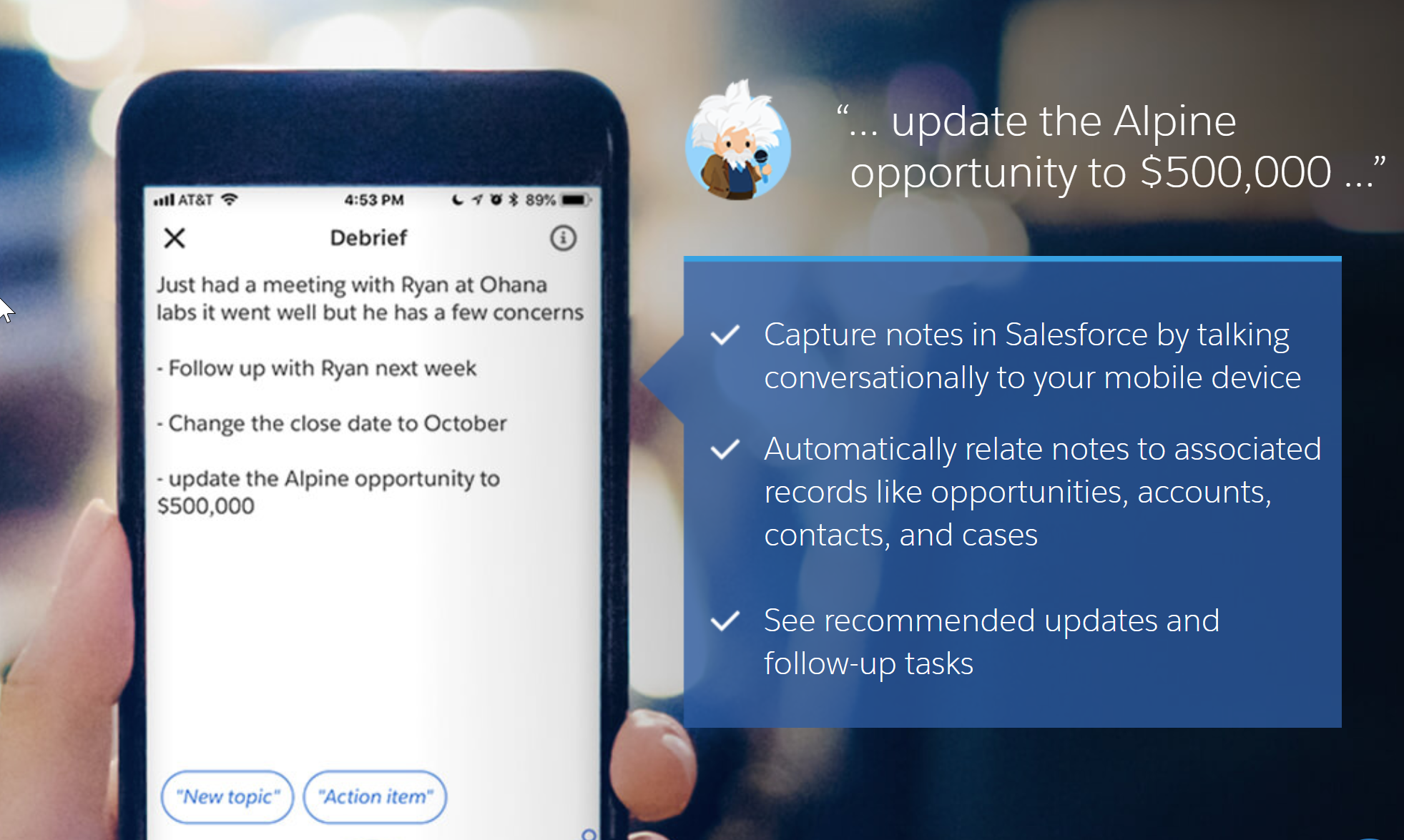
This is a feature that was announced at last year’s Dreamforce with huge excitement and anticipation, but it was never released. We are happy to announce that this key feature is finally ready for beta usage in the upcoming release. Now you will be able to speak into your phone or many other compatible devices like Alexa or Google Dot to enter your info into Salesforce without having to type anything. Some key features that already exist include: Opportunity and Task Updates, Einstein Voice Skills (a new feature we will elaborate on in a future post) and the ability for Einstein to suggest follow ups tasks. You can also receive briefings from many smart devices by simply using natural language like: Give me my daily briefing, or What accounts are at risk? There is no doubt that allowing Sales reps who are on the road to update info and add leads without having to type this in will address the biggest issue people have had with getting data into Salesforce – the need to get key people to enter data. This feature promises to have the biggest impact on timeliness of information and the quality of information in Salesforce.
#3 – Pardot Lightning Email Builder
Salesforce announced a real game changer by leveraging their familiar builder canvas with components on the left, properties on the right, and drag and drop WYSIWG in the center panel so you can create dynamic and powerful emails right in Pardot. Key features include a totally responsive capability right out of the box where moving the email to any device will result in the email scaling perfectly. The Email Builder also includes key features like Hover and Link capability, as well as a Call to Action button and a Survey Provider. The release date for this feature is not set right now, but hopefully Pardot users will see this feature in a release in 2020.
#2 – Einstein Prediction Builder & Next Best Action
Einstein Prediction Builder used to be a paid Service and now it is free and included with Sales Cloud. In a nutshell, Prediction Builder will look at all your historical leads and assess which leads converted using Machine Learning. It will construct a model that will enable you to identify the leads your team creates that have the highest likelihood of closing, which will enable your team to maximize their efficiency in the sales process. Predictions are unique to each company you create; the domain expertise and prediction builder does the rest!
- How much is this deal likely worth?
- How long will it take for this deal to close?
Or
- Is this Lead Going to Convert?
Prediction Builder will support Einstein Next Best Action helping you to cross sell, upsell.
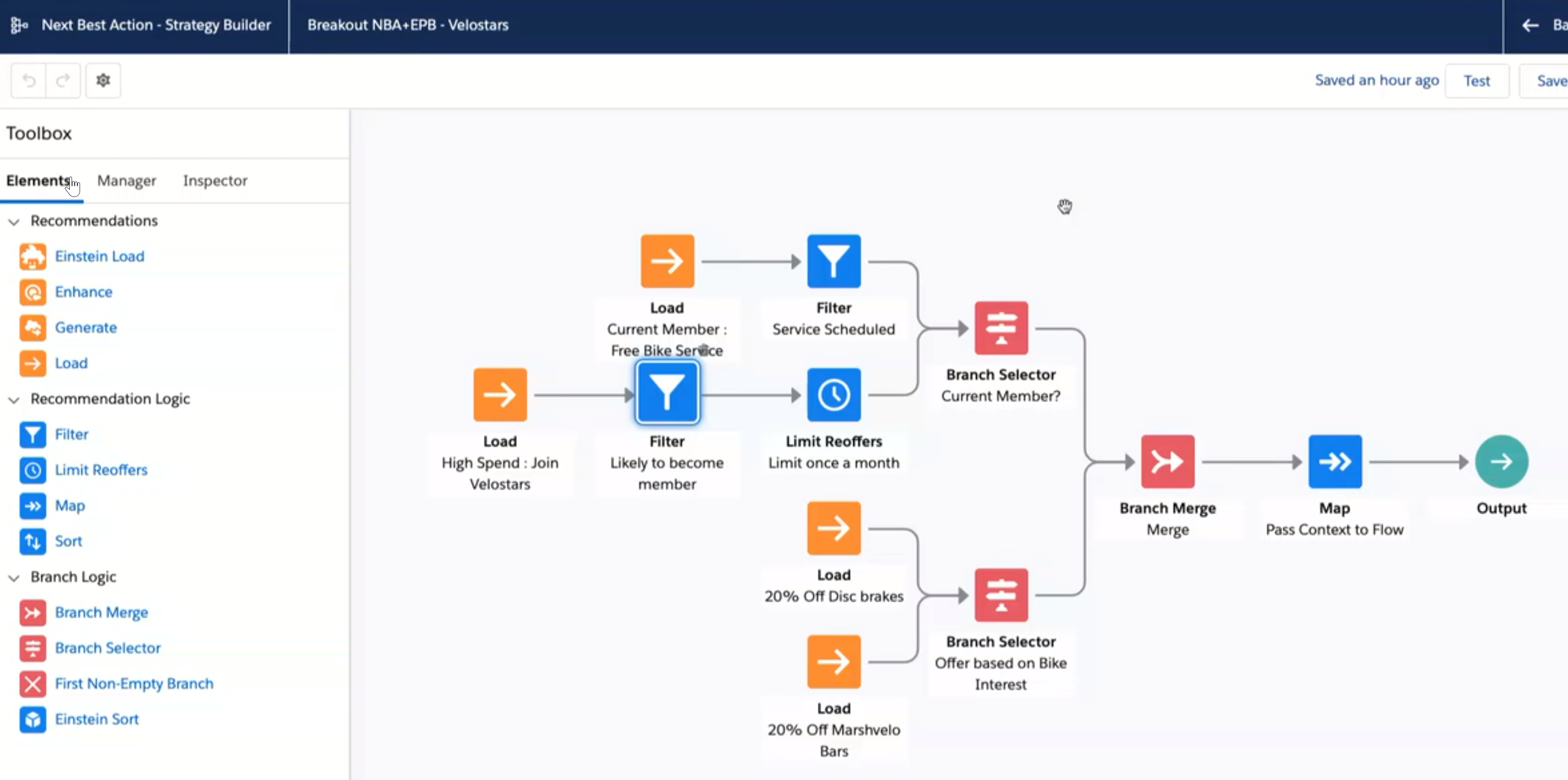
Next Best Action works on getting your insights to work together to create a unified decisioning layer in the form of a recommendation to a Salesperson’s desktop at the right moment and turn that into an action that results in a outcome (closed deal). Next Best Action also integrates to Salesforce Lightning Flow by allowing a customer to link to an automated workflow.
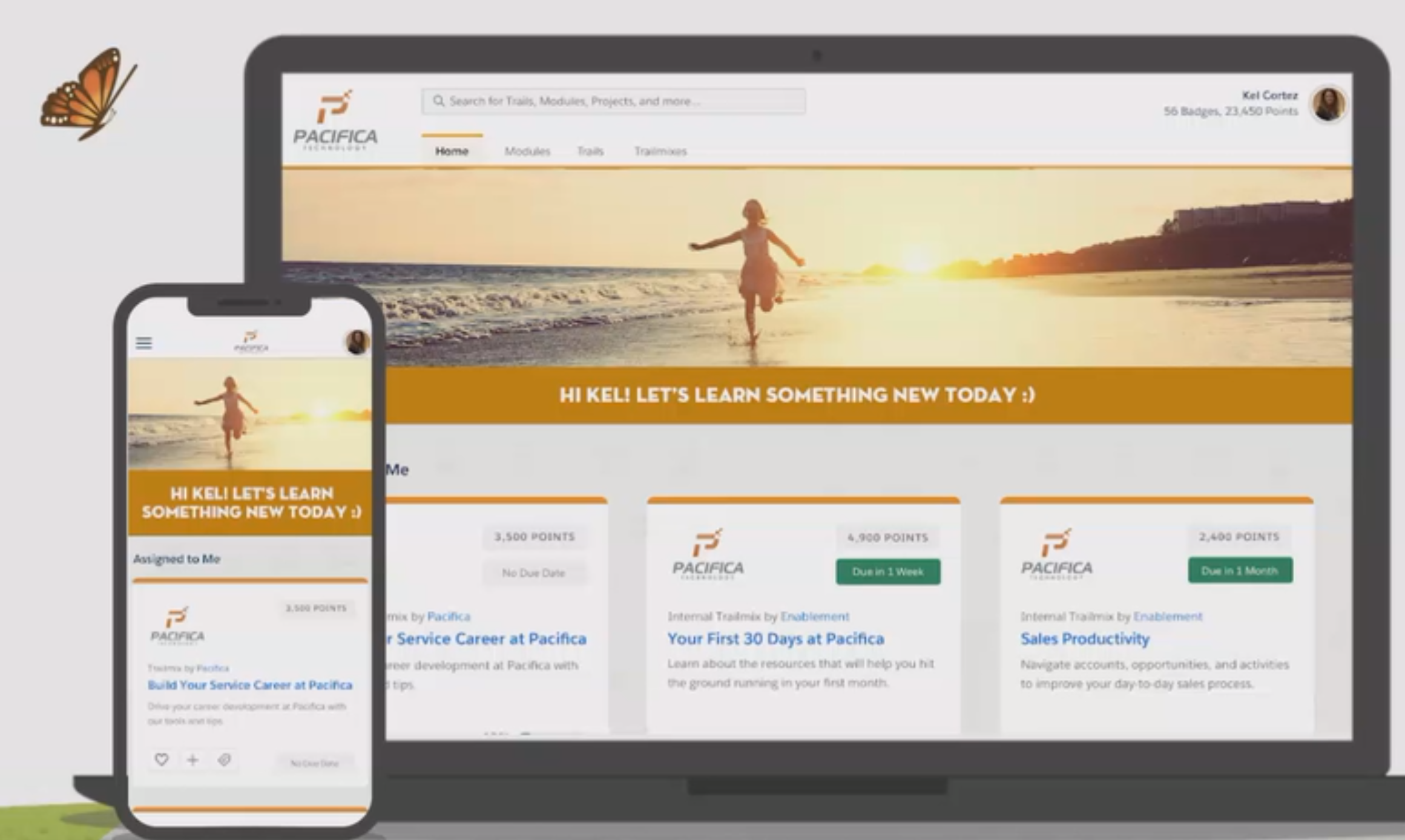
#1 – MyTrailhead
Salesforce is now offering companies the ability to leverage their world class learning platform to provide bespoke training for any company. Imagine a simple and user-friendly interface that will fast-track compliance and other core company-required training because of its’ usability. . With Badges used to incent employees and interactive videos and quizzes to confirm knowledge, the Trailhead platform provides a top-notch environment to ensure key financial services requirements are fully covered by all employees while making it fun and easy to complete.
Uses include:
- Supercharging the Employee Onboarding Process including critical Compliance Training
- Reinforcing the Company Culture
Conclusion
These features, available now or in Beta and some that will be available in 2020, are items your organizations should seriously consider for your Salesforce roadmap in 2020. Each of these features will add great value to key areas like data integrity, compliance, user adoption and user friendliness of your system. If you would like help with planning or implementing these solutions, or just get more info or a demo on these features, FinServ would love to help. You can reach us at info@finservconsulting.com or give us a call (646) 603-3799.
About FinServ Consulting
FinServ Consulting is an independent experienced provider of business consulting, systems development, and integration services to alternative asset managers, global banks and their service providers. Founded in 2005, FinServ delivers customized world-class business and IT consulting services for the front, middle and back office, providing managers with optimal and first-class operating environments to support all investment styles and future asset growth. The FinServ team brings a wealth of experience from working with the largest and most complex asset management firms and global banks in the world.
Mountaineering Tips for a Black Mountain Implementation
Hiking up any formidable summit requires experience, expert guidance, and determination to succeed. Navigating a Black Mountain implementation is no different. It can be a challenging and complex experience for asset managers that are not prepared to embark on the journey.
What is Black Mountain?
Black Mountain is a best-in-class, industry-standard provider of highly configurable front- and middle-office software solutions for investment managers. Part of newly formed Allvue Systems, owned by Vista Equity Partners, Black Mountain is an innovative suite of solutions for portfolio management, trading, credit research, and direct lending. Investment firms utilize Black Mountain to streamline critical business processes that are at the heart of all front- and middle- office activities.
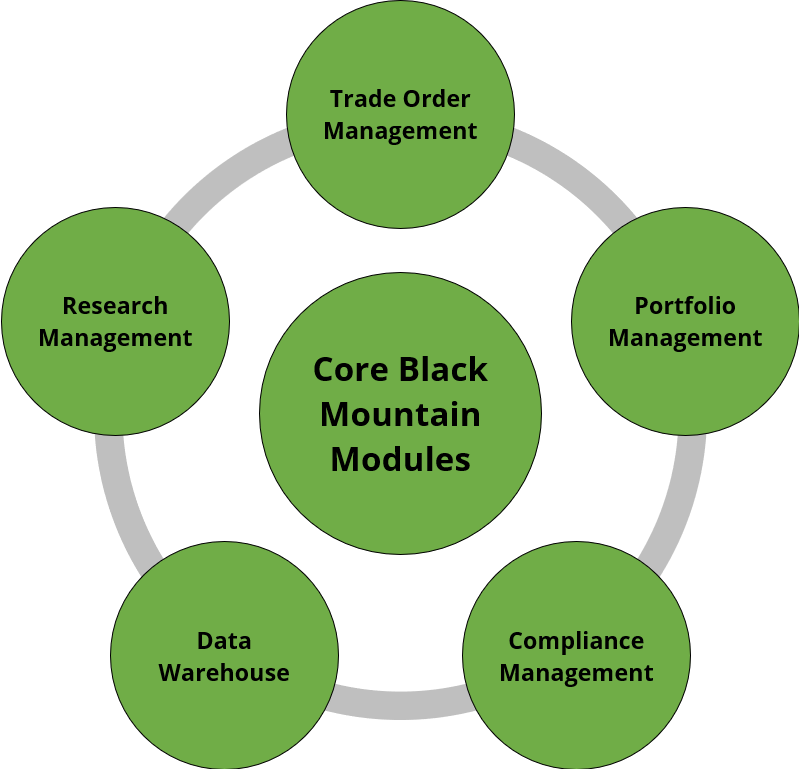
- Research Management: Integrates deal pipeline, analyst commentary, and ongoing coverage with trading activity and portfolio exposures. Includes the ability to push Excel-based financial templates into Black Mountain for aggregate research analytics.
- Trade Order Management: Streamlines order entry with broad asset class coverage including loans, bonds, municipal securities, equity, CDS, ABS, MBS, futures/options, swaps, repos, FX, and real estate. Easily accommodates data input controls, alerts, and custom portfolio allocation methodologies.
- Portfolio Management: Dynamic dashboards, charts, and analytics are tied to trading activity for all supported asset classes. Additionally, 3rd party data sets can be incorporated into the system to provide robust reporting capabilities to meet changing company, market, and regulatory needs.
- Compliance Management: Supports pre- and post-trade portfolio compliance via a powerful and robust compliance calculation engine.
- Data Warehouse: Facilitates historical data capture and reporting requirements. Enterprise data management tools can be leveraged in the system to define data priority, conflict resolution, and alert users using rule-based data gap checks.
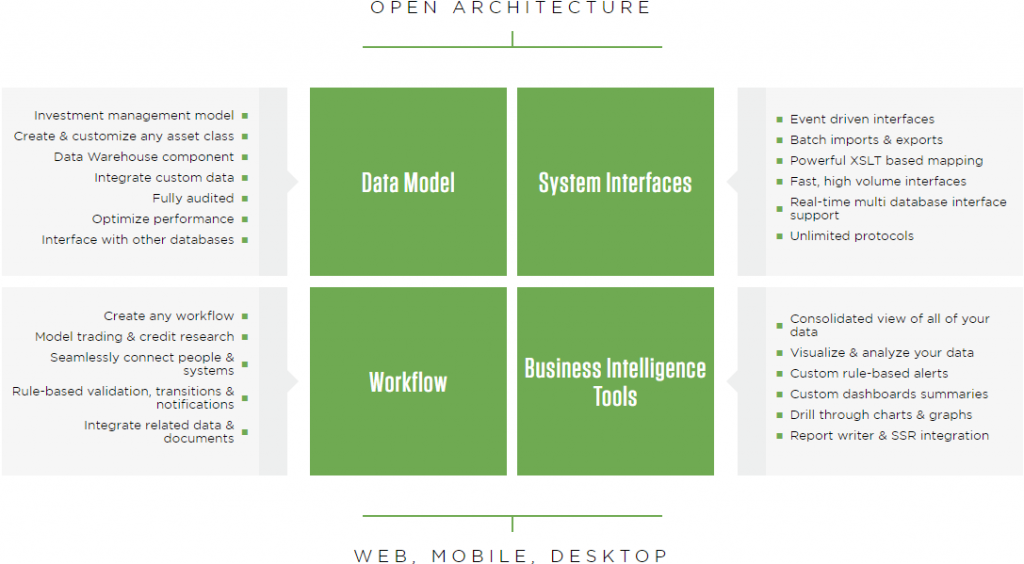
Source: Black Mountain Systems
What to Know Before Getting Started with a New Black Mountain Implementation
- Get Help Early: Don’t assume that you only need help after a Black Mountain contract is signed and the implementation officially begins. There is valuable preparation work that can and should begin well ahead of any Black Mountain implementation. The clearer current and desired future state are defined (and documented) before involving the Allvue implementation team will only improve the quality of overall system design, reduce the risk of misinterpretation, and will save time/budget in the long-run.
- Don’t Rush the Scoping Process: In a similar theme, resist the urge to “just get the implementation started”. Black Mountain implementations start with a handful of scoping sessions/workshops to formally outline the core project scope, assumptions, and risks in the form of a Scope Document. While additional requirements gathering will take place in an agile fashion throughout the project, the initial Scope Document will govern your initial project budget. It is easy to misinterpret what you are getting if you are not familiar with Black Mountain and it is important to manage expectations on all sides.
- Out-of-the-Box Solutions Still Need Initial Configuration: Every Black Mountain client is different. Even though Black Mountain has a treasure trove of standard, out-of-the-box features and functions, much of it still requires configuration before being usable in a production environment.
- You Need to Understand Your Data: Garbage in really is garbage out. Not only does data need to be clean before being consumed by Black Mountain, but you need to be proactive about how to resolve data conflicts. This includes understanding data origination, priority, and downstream reporting dependencies. If the same field can come from multiple sources, which source should be used and in what scenarios? Do you need an additional Security Master solution on top of your Black Mountain implementation?
- The More You Know, the More You Will Want: As your team gets more familiar with the power of the Black Mountain platform, get ready for new ideas and user requests. Setting aside a reasonable budget to handle new requests will help you address these requests and improve user satisfaction/adoption.
- Aim to Leverage 3rd Party BI Tools for Reporting: Consider leveraging 3RD party BI tools like Microsoft Power BI or Tableau via Black Mountain APIs in order to self-service a larger portion of your dashboard/reporting needs via direct systematic access to your data stored in Black Mountain.

How FinServ Can Help
- Ability to Bridge the Gap: The FinServ team is made up of talented consultants that possess both a deep level of industry knowledge and technical expertise. Coupled with the team’s Black Mountain platform knowledge, FinServ is able to help clients bridge the knowledge gap with the Allvue implementation team to streamline the implementation process by calling out potential design limitations and clearly articulating complex requirements using cross-functional workflows, UI/UX wireframes, and by creating detailed end-user documentation.
- Project/Program Management: FinServ provides best-in-class project management staff that are experts in managing scope change requests, issue logs, preparing executive level presentations, and detailed weekly status reports. These activities together ensure that all levels of the client organization are kept up-to-date on the most critical aspects of the project progress and that issues are escalated proactively.
- Business Analysis, Data Analysis, and Documentation: FinServ skilled business analysts can support clients by providing hands-on project delivery activities like documenting requirements, performing data mapping, testing, and creating formal system documentation that otherwise would take you away from your day job.
- Full-time, Onsite Consultants with White Glove Service: FinServ can provide full-time, onsite consultants to support a Black Mountain implementation. This level of support ensures that any issues that arise are immediately reviewed and often resolved immediately. For any issues that cannot be resolved immediately, detailed resolution requirements are documented and provided to the vendor for immediate remediation, testing, and verification back out to the user.
The Bottom Line
Black Mountain is a robust, powerful platform for investment managers, but getting started with a Black Mountain implementation can be a daunting task if you don’t prepare ahead and don’t have the right adviser supporting you on your journey. FinServ Consulting’s Black Mountain expertise and unparalleled track record of service for asset management clients makes us the right partner for any Black Mountain project.
To learn more about FinServ Consulting’s services, please contact us at info@finservconsulting.com or (646) 603-3799.
About FinServ Consulting
FinServ Consulting is an independent experienced provider of business consulting, systems development, and integration services to alternative asset managers, global banks and their service providers. Founded in 2005, FinServ delivers customized world-class business and IT consulting services for the front, middle and back office, providing managers with optimal and first-class operating environments to support all investment styles and future asset growth. The FinServ team brings a wealth of experience from working with the largest and most complex asset management firms and global banks in the world.
Implementing Workday – What Your IT Staff Can Expect
If you are considering implementing Workday for your Human Capital Management (HCM) and / or Financial system needs, then you are likely aware that Workday is a Software as a Service (SaaS) application – centrally hosted and consumed over the Internet as a Service. The SaaS model will save your organization time and money on the maintenance tasks typically associated with an on-premise software installation. What it won’t do is absolve your IT staff from all Workday responsibilities, rather your team’s responsibilities will shift. Depending on your organizational structure, this role can stay solely within IT or it can be split between IT and the Business.
Let’s review the traditional on-premise software model and how your staff supported it.
| On-Premise Software Support Responsibilities |
|
|
|
|
|
|
|
|
|
|
With Workday, your IT Staff largely pivots away from the infrastructure maintenance to an application maintenance and integrations focus. Your staff would support Workday’s “Delivered Value” as defined in the Workday Technology Illustration below.

Let’s examine each “Delivered Value” item to determine how they translate into responsibilities for you and your staff.
Web Familiar Experience
Workday’s main user interface is through the Web Browser and will be how your users primarily interact with Workday (there is also an App).
Enabling your users to access Workday will be dependent on your staff and this can include the following application Maintenance and Support tasks.
- Adding and configuring New Users in Workday including Single Sign-On (SSO) set up
- Disabling Terminated Users
- Setting login and password expiration settings
- Monitoring New Releases and reviewing their corresponding System Release Notes
- Using Business Analysis to plan and manage projects for Enhancements and Additional Component Activation
- Keeping abreast of major functionality changes that will benefit your firm such as Workday Prism Analytics
- Configuring and Testing System Changes
- Troubleshooting User Issues and Managing the Issues to Resolution
- Administering your Workday environments (tenants) – Production and Staging to manage system refreshes and upgrades
Enterprise Reporting
Workday will become the Golden Source for your firm’s Human Resources and Financial data. Naturally, your users will want to take advantage of this and will want a comprehensive set of reports. Building these reports will require your staff to understand how Workday stores the data and how to extract the data using specific report types.
Furthermore, you will also need to think beyond Workday to consider how HR and Financials data in Workday can augment and complement the data in other areas of your firm. At many of our clients, the strategic vision in consolidating all of the firm’s data involves another tool, usually a Data Warehouse.
- Building Matrix Reports
- Building Advanced Reports
- Building Composite Reports
- Understanding the available set of pre-configured reports
- Planning how Workday data can be used throughout your firm
Integration On-Demand
Central to Workday’s functionality is the ability to communicate your data with both internal and external parties. Internally, you may want to have Workday interact with your internal CRM system such as Salesforce (typically for deal pipeline or other customer management). Externally, you will want to have Workday interact with your various Vendors for Procurement Punch-Outs, Banking Transactions, Benefits and Payroll. This data flow is done via Integrations / API Calls that were initially set up during the initial Workday deployment by the Workday Integrators.
Maintaining the Integrations, API Calls and related File Transfer Infrastructure will fall on your staff and the responsibilities include the following:
- Mapping out both internal applications and external vendors that will interact with Workday
- Monitoring Integration Runs and Troubleshooting Errors
- Collaborating with Vendor Contacts to determine the root cause and resolve
- Building custom Integrations in Workday Studio (if standard integrations do not meet requirements)
- Configuring and maintaining a File Transfer Server (if necessary) with secure file protocols such as SFTP, SSL, SSH, etc.
- Supporting file encryption with keys such as PGP keys
- Configuring the Firewall to white list Vendor IPs to allow the Vendor to connect to your File Transfer Server
Configurable Business Processes
Business Processes allow you to define and create your firm’s workflow in Workday. For example, to hire a new employee, each firm will have their own steps to initiate the hire process, enter data, run background checks, obtain approvals, etc. This process is taken from your firm and then re-created in Workday.
Your staff will need to develop their Business Process skills to support the business in the following manner.
- Investigating and Resolving Business Process Issues
- Creating and / or modifying Business Processes
- Tracking approvals given for Business Process changes through the Request Framework or other internal tool
- Reviewing and Analyzing the Business Process for risks due to Key Man Dependency, Separation of Duties, Improper Access Granted, etc.
Summary
Implementing Workday will require your IT staff to be fully committed and involved in the implementation from the beginning. This is critical for a successful implementation and a seamless operational support transition. Your IT staff will not be as focused on Physical Infrastructure but rather on Workday and the systems / components related to Workday. IT’s role is critical for segregation of responsibilities and allows your firm to successfully address audit points and regulatory concerns. This post is designed to guide and instruct you on the changes to come to you and your staff. FinServ has advised multiple clients on supporting their Workday implementation, augmenting their support staff and improving upon existing processes. FinServ is an experienced Workday integrator with the deep industry expertise needed to configure Workday optimally for your firm. For help in implementing or enhancing Workday, contact FinServ at info@finservconsulting.com or give us a call at (646) 603-3799.
About FinServ Consulting
FinServ Consulting is an independent experienced provider of business consulting, systems development, and integration services to alternative asset managers, global banks and their service providers. Founded in 2005, FinServ delivers customized world-class business and IT consulting services for the front, middle and back office, providing managers with optimal and first-class operating environments to support all investment styles and future asset growth. The FinServ team brings a wealth of experience from working with the largest and most complex asset management firms and global banks in the world.
What Keeps a CTO Up at Night and How a Managed Service Provider Can Help
Hedge Fund Chief Technology Officers (CTO) face a litany of responsibilities ranging from:
- Maintaining the technical infrastructure necessary to run their firms
- Overseeing regulatory compliance in the technology stack
- Guarding the firm’s non-public data and systems
- Managing critical investment and trading systems
- Shepherding the firm’s adoption of future technology paradigms
To deal with each challenge effectively and comprehensively, CTOs need to narrow their focus to the key issues that involve protecting the firm and their investors and ideally giving the firm a competitive advantage.
Infrastructure / Support tasks can in some cases be removed as a distraction and partially or wholly outsourced to a Managed Service Provider (MSP), a company that remotely manages a customer’s IT infrastructure, applications and / or systems. Often, leveraging the right MSP will allow a fund to redirect their investments in physical infrastructure and onsite support of that infrastructure to other more mission critical projects. With the right MSP partner, a fund can scale quicker and create a robust infrastructure, supporting enhanced performance and productivity, while leveraging the deep and specialized expertise of the MSP. This is especially true with the popularity of Azure and AWS, where the right MSP has deep expertise in leveraging these environments and locking them down securely, an expertise that many funds do not want to hire for internally.
The decision to use an MSP may seem straightforward. But, in order to use an MSP successfully, several factors must be thought through before even engaging with the MSP. (Note that, while we assume you are working with MSPs for the first time, even if you currently have an MSP and are looking to replace them, our subsequent advice is still relevant!) When FinServ performs a vendor selection for our clients in the MSP arena, we focus on the following key questions and on documenting the existing state of key items to facilitate the transition:
| Key Activities |
|
|
|
|
|
|
MSP Goals
In order to successfully choose and onboard an MSP, it is critical to understand and document the main goals you are ultimately trying to accomplish and how. Consider the following:
| MSP Goals |
|
|
|
|
|
|
|
|
|
|
|
|
|
|
|
|
|
|
IT Current State
The MSP’s responsibility is to take on the tasks that your current IT staff is doing. How do you communicate that clearly and succinctly to the MSP so that both parties have a common understanding of what tasks are in scope?
The answer lies in having a full understanding of what your existing IT footprint is and what your current IT staff does. Rationalizing their current roles and what the target operating model will be is crucial to a successful transition.
To effectively outsource tasks that were handled internally to an external party, it is critical to understand all tasks that your staff does, system dependencies and external dependencies. Once you have a holistic picture, you can then go through the exercise of segregating tasks that will be outsourced and those that will remain in-house. With a clear definition of the tasks that you expect the Managed Service Provider to take on, the expected roles and responsibilities will start to become evident.
To achieve this goal, FinServ developed a “Functions of a Hedge Fund” map which allows us to review all the functions you have and then efficiently highlight which functions will be targeted for partial or full outsourcing. This becomes a key document to share with the vendors during the selection process.
Questions to ask yourself include:
- Do you have a complete and well documented picture of your firm’s IT hardware and applications?
- Do you have a comprehensive and well documented view of what the IT staff does? Ask yourself, your managers and your staff. This operational assessment exercise might surface some unexpected discrepancies in your understanding of their tasks to what they actually are
- Which tasks will be outsourced?
- Does the MSP have the resourcing / skill-set to do those tasks effectively?
- How will the MSP be enabled to do those tasks effectively?
The FinServ team are experts in comprehensive current state documentation. We can quickly document these current state items to ensure the selection process is based upon your firm’s unique footprint and requirements.
Choose and Assess the MSP
As the technology thought leader, you should determine and agree on how you will choose the MSP. Choosing an MSP is no small task and to give yourself the best chance at success, this needs to be carefully considered. Having an experienced consultant like FinServ with specific knowledge of the MSP marketplace and industry trends can increase your firm’s chances for success.
| Choose and Assess |
|
|
|
|
|
|
Onboarding and Managing the MSP Relationship
Equally as important as selecting the right MSP for your firm, ensure you can properly onboard and manage the MSP. In most cases, we have seen that clients do not have the dedicated resources to see this part of the MSP process through. Should that be the case, it is critical to get an experienced consultant like FinServ who can provide dedicated expert resources to lead you through the process.
Once the MSP is onboarded, they will need to be managed – you will need to have measures of success in place to measure the MSP’s performance. As part of the selection process, meeting with each MSP candidate to review their understanding of how you will evaluate their performance is critical. Consider items such as:
| Onboarding and Managing the MSP |
|
|
|
|
|
|
|
|
|
|
|
|
|
|
|
|
Summary
If any of these themes resonate with you and your organization, please reach out to FinServ. FinServ has advised and managed multiple Funds through selecting and onboarding a Managed Service Provider.
By leveraging our methodologies and industry best practice tools we can expedite your selection and ensure a successful onboarding process saving both time and money and ensuring this complex and critical process meets the goals you set for it at the start.
If you already have an MSP, but they are not providing the services that you require, the same thought processes and best practices are still relevant when replacing your existing MSP.
Throughout our 15 years of existence, we have proven that our deep industry knowledge combined with our project management and overall best practice methodologies can be an asset to your organization. To further continue the conversation or to discuss more of FinServ’s capabilities, please contact FinServ at info@finservconsulting.com or give us a call at (646) 603-3799.
About FinServ Consulting
FinServ Consulting is an independent experienced provider of business consulting, systems development, and integration services to alternative asset managers, global banks and their service providers. Founded in 2005, FinServ delivers customized world-class business and IT consulting services for the front, middle and back office, providing managers with optimal and first-class operating environments to support all investment styles and future asset growth. The FinServ team brings a wealth of experience from working with the largest and most complex asset management firms and global banks in the world.
Top 5 Ways to Automate Data Entry in Salesforce
The Challenges with Data Entry
One of the biggest complaints we hear from our clients is that users don’t enter their data properly (or at all). It’s astounding that even though technology is making exponential leaps, this same core issue remains.
Fortunately, Salesforce has many tools available that require little or no effort to implement and will make it much easier for your users to get their data into Salesforce.
Here is a list of the top 5 ways FinServ has leveraged the tools in Salesforce to make it easier for users to provide the vital data your business requires. Most of these items are very easy and you can implement on your own, but we are always happy to put them in place for you if you need assistance.
- Create an Appealing Data Entry Screen – Lightning Page Layouts
When Salesforce introduced the Lightning Page builder, they provided an easy to use Drag & Drop interface to customize the layout of your key record pages. With the addition of Tabs & Accordion views, the amount of information a user can access on the screen grew exponentially. In addition, the look and feel of the new Lightning Experience is far more aesthetically pleasing, which has been shown to enhance the user experience with all applications.
When you combine this new tool with updates to your Page Layout, you can maximize how efficiently your users can access the data they need to update.

If you have not already upgraded to Lightning, you need to do this immediately. Not only will Salesforce be moving all customers over to Lightning by the end of 2020, but the improvements to the User Interface alone justify making the update because they make data entry so much easier.
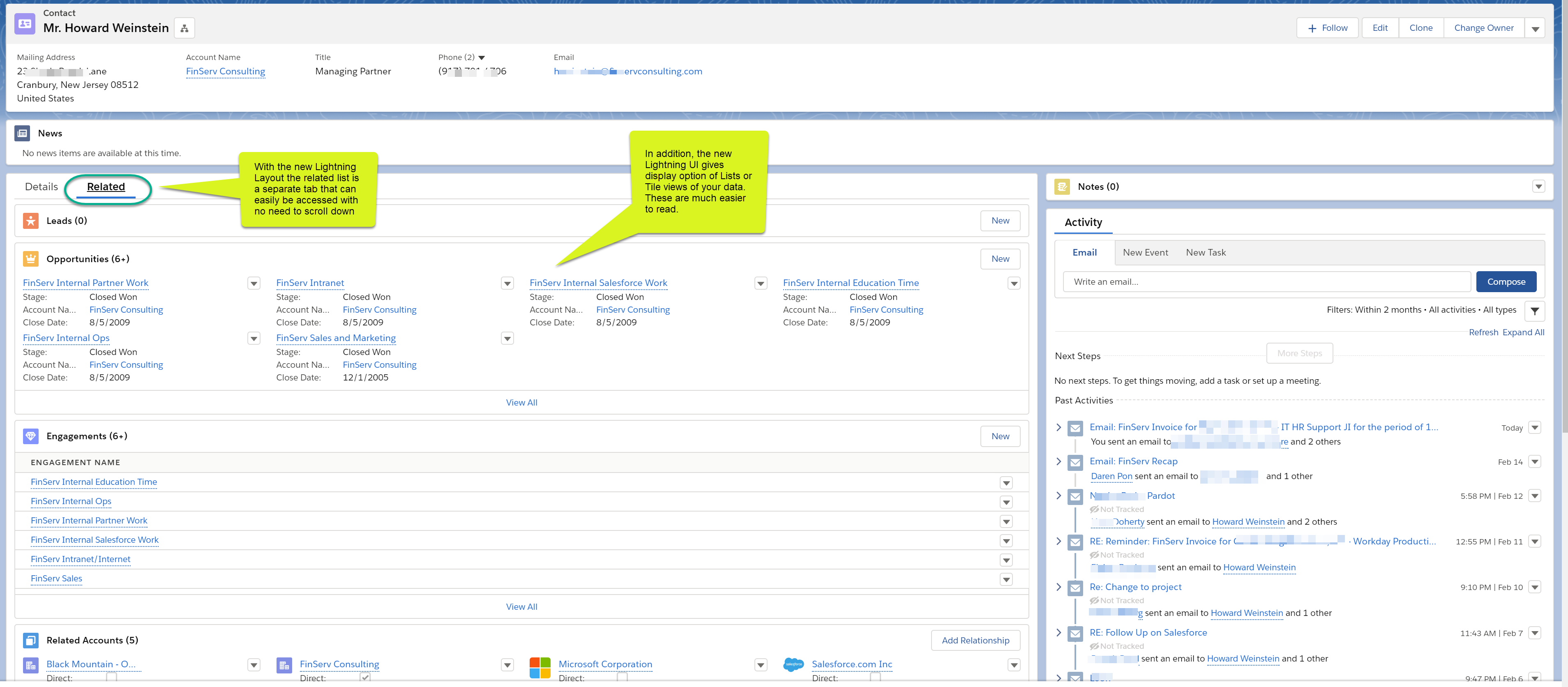
With the move from Classic to Lightning, Salesforce eliminated the “Vertical Scroll of Death,” which is what Salesforce users referred to as the endless vertical scrolling required to view your data in Salesforce Classic (see screenshots below for comparison of Classic to Lightning layouts).
There is a ton of great out-of-the-box Components that will save you time which your users will love; here is a list of the ones we have found to be the most useful:
Tabs – Replace the need to scroll by adding tabs to your page. You can then add other components into your tabs like Related Lists.
Related List Single – We find this one most useful, especially when you have one item related to your record and you want to place it somewhere prominent. A great example of this are files related to your contact you have saved.
Recent Items – Provide users with the last items they interacted with, as these may need updates.
Related Record – Provide users with records that are related to the current one, again making it easy for them to update information.
(Below is an example of a Contact profile in the Lightning UI, you can see that the Activity can be placed conveniently to the right sidebar to maximize the usefulness of the screen, and tabs are used to provide access to related lists with no scrolling required)
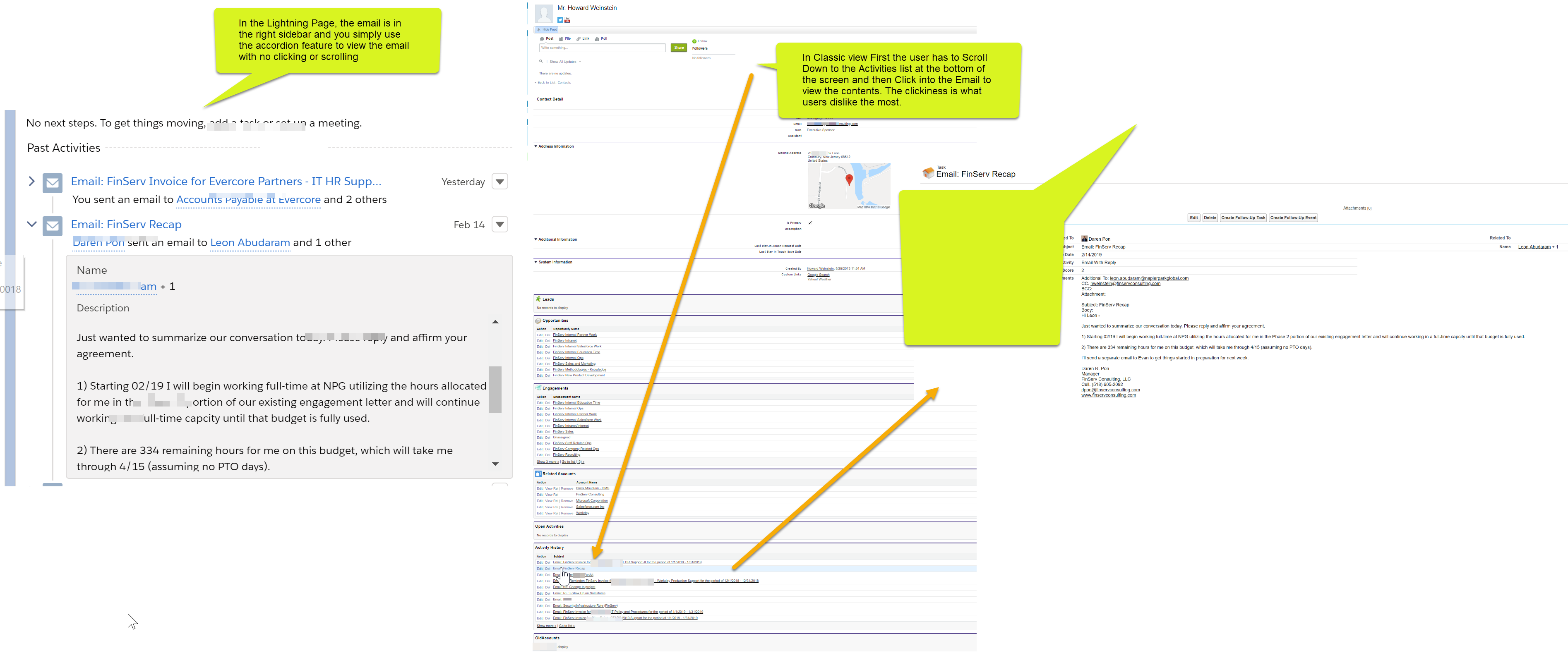
(The screenshot below shows on the left the Contact record in the Lightning UI. Email activity is easy to access and can be viewed with no clicking or scrolling. On the right the classic view which requires both scrolling and multiple clicks to access the same information)
- Provide an Intelligent, Interactive Data Entry Experience to Users – Automated Workflow
One of the lesser used, but most useful features in Salesforce is its workflow tools. In the Spring ’19 Release, Salesforce rolled out its new Flow Builder which provides a more user-friendly interface compared to the old Cloud Flow Designer.
The essence of the new Flow Builder engine works the same way and it is incredibly valuable for data entry. With the Flow Builder, you can create custom wizards and screens for your users to make entering data much more user-friendly (see example below). Additionally, you can use the lookup features in the workflow engine to fill in data for your users or facilitate the selection of values with pre-selected records, pulldowns, and many other easy-to-use features.
(How you can build intelligence into a wizard so that your users answer questions which populates all the sales data for your leads)
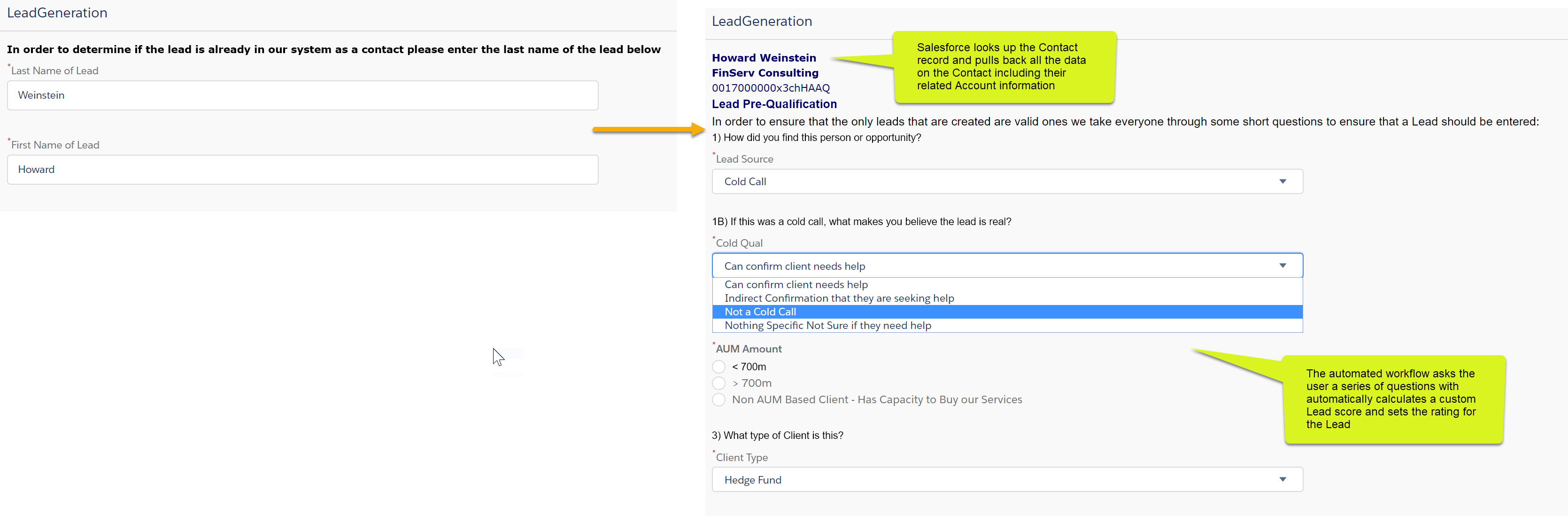
At FinServ, we use this capability to provide some additional support to our Sales team when entering a new Lead. Since our lead process is a little unique (we prefer to utilize an existing Account and Contact related to the Lead), we use the Wizard function to determine if that person exists in the system first. If the person does exist, the flow will automatically fill in the contact’s details for the Lead, along with the Contact’s Account information (see example above). If the Contact and/or Account does not exist, the flow takes the user through a series of user-friendly screens, so a new Contact and Account record can be created.
As you can see, the actual workflow below has several steps, decision points, and other features that Salesforce provides with its Flow Builder tools.
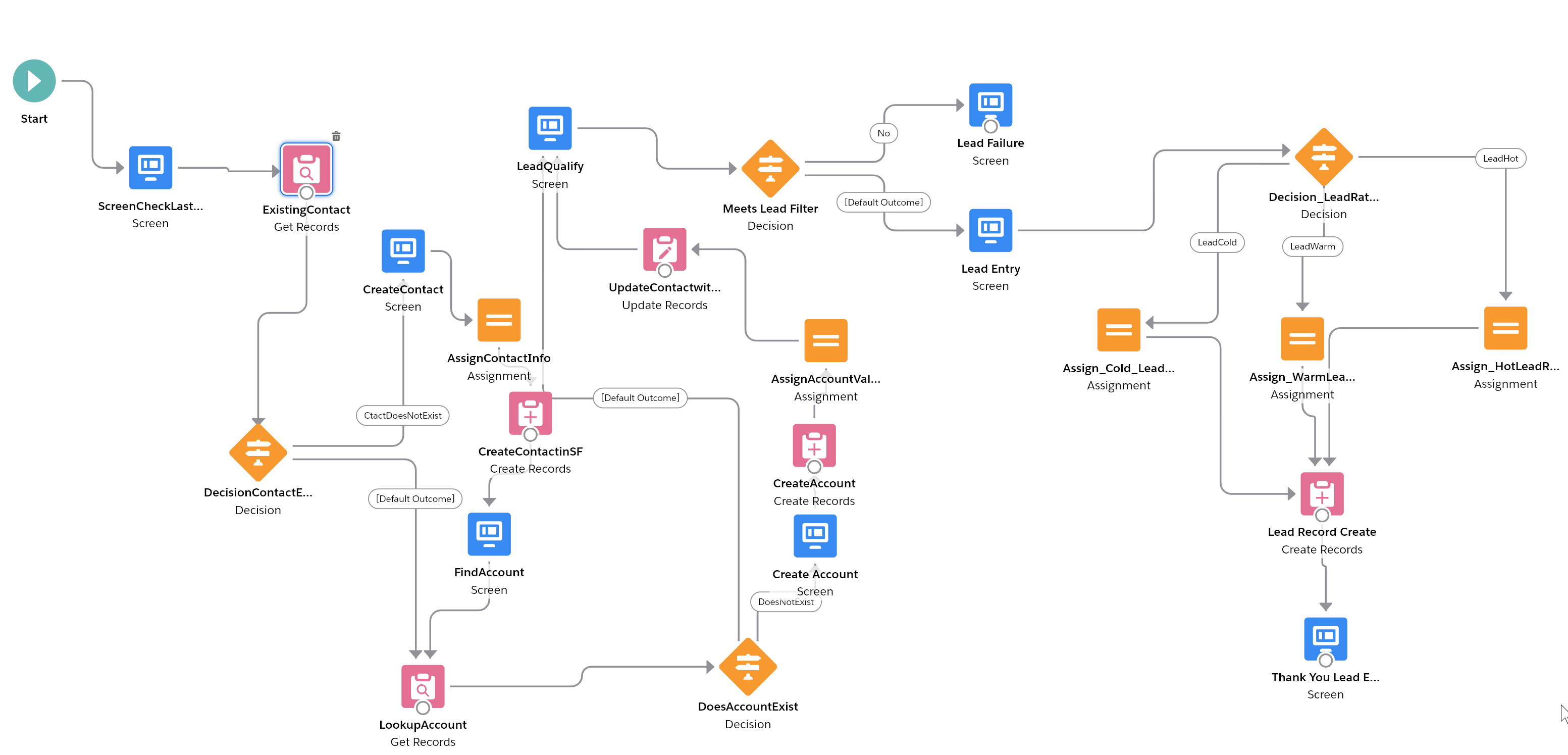
All the flow work can be done without any code, through user-friendly screens (see example below) with various options and dialog boxes. More advanced users can combine items using code and Salesforce’s Lightning Components to create very sophisticated user experience.

- Hands-Free Data Entry with Artificial Intelligence – Einstein Voice
We featured Einstein Voice in a previous post, and it is one of the most exciting and best ways to get your busy sales people to enter their data into Salesforce. Your users no longer need to enter their data manually. They can simply speak into their smartphones and Salesforce will use Voice Recognition and Natural Language Interpretation to receive and parse out the message. Salesforce then creates and updates the related records in your Salesforce instance based on the keywords used. Einstein Voice can also notify other team members who have a relationship to the update, alerting them that there is something in the system they need to act on.This is truly the biggest and best thing that has happened in Salesforce for some time and promises to revolutionize data entry.
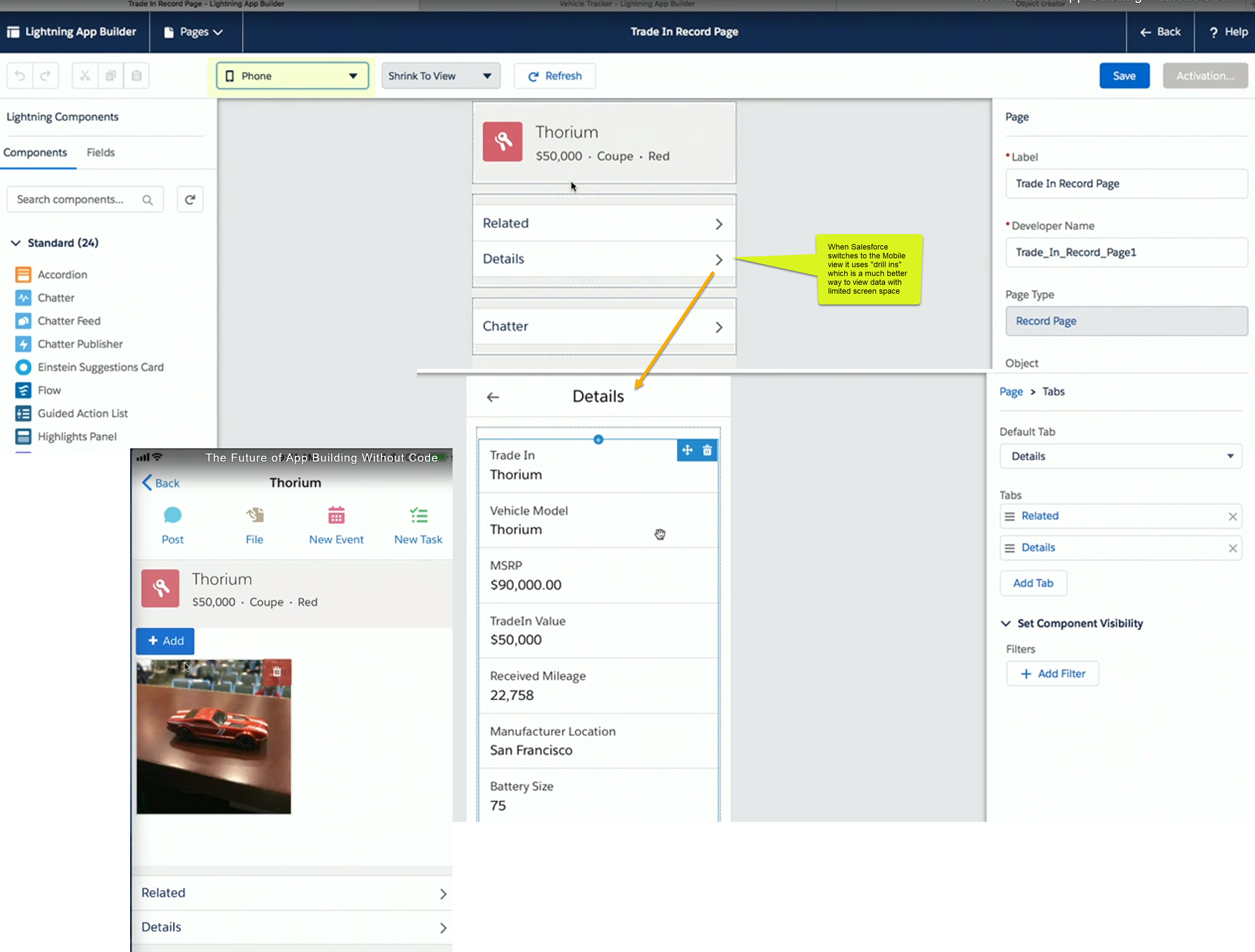
- Empower Their Smartphones – Custom Mobile Experience
If you are not ready to jump fully into AI with Einstein Voice, Salesforce offers the ability to customize your smartphone and tablet experience with the same features described in the Lightning Page Layouts section. You can customize the Navigation experience for your users by deciding what items they see in the Salesforce App, as well as the order of those items.You can arrange your global actions for all your users, placing the most important items that you want your users to perform at the top, like creating new leads or logging a sales call. Compact layouts allow you to put the most important information for a record at the top, so users can access the key information they need quickly, like a phone number for a contact. For smartphones, this feature is a must.
(The compact layouts for the mobile users are both visually appealing and huge time savers when editing data on the road)

(The screenshot below shows a sophisticated app page that was custom built for a mobile phone, even leveraging the phone’s camera to allow the user to insert a photo into the record)
- Setting Tickler Notices and Reminders for your Salespeople – Time-Based Workflow & Rules
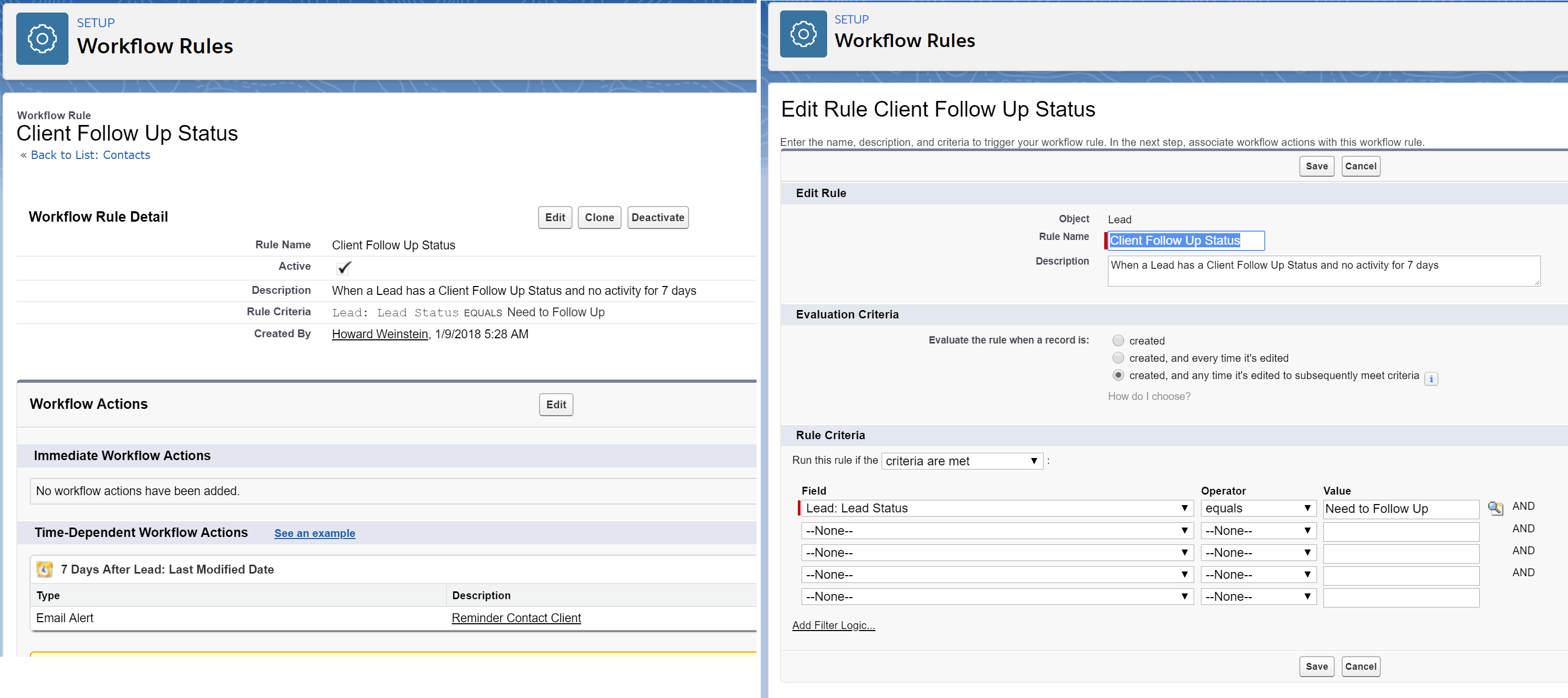
This may be a more sensitive one, because not all users like to be reminded to update their data, but it is a great way to ensure the information in your system does not become stale.
For instance, you can set up a rule so that once a lead is generated, if the lead has not been updated after 10 days, Salesforce automatically sends a reminder to the person who opened the lead.

In our experience, this has been the number one way to ensure that key records get updated. This approach can be applied to any record type in Salesforce, and there are an infinite number of ways to implement rules that can become very sophisticated.
Again, this solution requires no code, since you simply use Salesforce’s user-friendly features including: Classic Email Templates, Email Alerts, and Workflow Rules & Tasks.
Conclusion
These are just a few of the amazing tools Salesforce offers to make the drudgery of data entry so much easier for users. FinServ implements these best practice solutions and more for our clients, whom benefit from far improved user group satisfaction and exponentially better data quality. This in turn leads to greater Salesforce platform adoption and stronger ROI on existing Salesforce technology investments. If you would like help with solving your data entry issues, FinServ would love to help. You can reach us at info@finservconsulting.com or give us a call (646) 603-3799.
About FinServ Consulting
FinServ Consulting is an independent experienced provider of business consulting, systems development, and integration services to alternative asset managers, global banks and their service providers. Founded in 2005, FinServ delivers customized world-class business and IT consulting services for the front, middle and back office, providing managers with optimal and first-class operating environments to support all investment styles and future asset growth. The FinServ team brings a wealth of experience from working with the largest and most complex asset management firms and global banks in the world.