Workday R1 2026: Key HCM Enhancements & What HR Teams Need to Know
Workday R1 2026 introduces meaningful HCM updates that impact job changes, reporting visibility, and case management workflows. These enhancements focus on workflow precision, data integrity, and improved visibility for HR teams and managers.
Job Change & Correction Improvements
Previously, correcting an error on a job change often required a full correction of the transaction, including:
- Rescinding the job change
- Re-triggering approval workflows
In R1 2026, HR can now correct specific fields within a job change transaction—including Supervisory Organization, Position, and position handling—without rescinding the entire business process. This reduces downstream disruption, preserves audit trails, and eliminates unnecessary re-approvals.
Impact: Faster corrections, cleaner data, and fewer manual reversals.
Worker Document Management Enhancements
R1 2026 delivers enhancements to Worker Document Management, giving HR teams greater control over how employee documents are categorized, retained, and shared. Key improvements include:
- Expanded document category configuration, allowing organizations to define and apply more granular document types across the employee lifecycle
- Improved visibility controls determining which roles can view, upload, or manage documents by category
- Enhanced retention policy support, enabling organizations to configure document lifecycle rules that align with internal recordkeeping standards.
For asset managers operating under SEC, FINRA, or other regulatory frameworks, this is a meaningful upgrade. Employee documents—such as Form U4 acknowledgments, attestations, licensing records, and annual certifications—are subject to strict retention and access requirements. R1 2026’s enhancements make it easier to manage these documents directly within Workday, reducing reliance on external document repositories and strengthening audit readiness.
Impact: Stronger document governance, improved compliance posture, and reduced operational risk for regulated firms.
Enhanced HR Case Management Dashboard
R1 2026 enhances the HR case management dashboard with improved centralized trend analysis. For asset managers and financial services firms, this is particularly relevant for:
- Tracking compensation and benefits-related cases across employee populations, including front-office staff with complex pay structures
- Identifying patterns in onboarding cases tied to licensing, regulatory clearances, or background check delays common in regulated industries
- Monitoring SLA performance for HR service delivery across business lines
For example, if case volume rises around annual bonus cycles or new fund launches, HR can use this dashboard to proactively triage workload, identify recurring issues, and improve response times.
Impact: Stronger workforce support and proactive issue resolution tailored to asset management operations.
FinServ’s Recommendation
Based on our review of R1 2026, here is where FinServ believes clients should focus their attention:
Job Change Corrections carry the most immediate operational value for firms managing high volumes of personnel transactions. We recommend reviewing which security roles currently have access to correction steps and ensuring appropriate controls are in place before the release goes live.
Worker Document Management enhancements are particularly high-value for clients in regulated industries. FinServ recommends auditing your current document categories and security role assignments before the release, and evaluating whether your existing document retention practices can be brought into Workday to reduce dependence on external systems.
Case Management Dashboard improvements are worth evaluating, particularly for clients with dedicated HR service delivery teams. FinServ recommends assessing your current case categorization taxonomy and dashboard configuration to determine whether enhancements in R1 2026 require updates to align with your operating model.
Real-World Impact
The HCM enhancements in Workday R1 2026 address the evolving needs of financial services HR organizations. Improved job change correction capabilities reduce administrative rework and protect data integrity—a meaningful benefit for firms managing frequent personnel changes across investment teams, middle office, and support functions. Worker Document Management enhancements strengthen compliance posture by enabling tighter control over document categorization, access, and retention directly within Workday—reducing audit risk for firms subject to SEC, FINRA, or other regulatory frameworks. Enhanced case management dashboards provide clearer visibility into workforce trends, enabling HR teams to respond more proactively to operational bottlenecks and service delivery gaps.
Together, these updates strengthen governance, streamline approvals, and improve overall workforce process efficiency in ways that align with the operational complexity of asset management environments.
To maximize the value of Workday R1 2026 HCM updates, partner with FinServ—a trusted advisor with deep Workday and financial services expertise. FinServ provides release impact assessments, configuration reviews, and change management guidance to help organizations adopt enhancements confidently and turn system updates into measurable workforce improvements.
About FinServ Consulting
FinServ Consulting is an independent, experienced provider of business consulting, systems development, and integration services to alternative asset managers, global banks, and industry service providers. Founded in 2005, FinServ delivers customized world-class business and IT consulting services for the front, middle, and back-office. FinServ provides managers with optimal and first-class operating environments to support all investment styles and future asset growth. The FinServ team brings a wealth of experience working with the world’s largest and most complex asset management firms and global banks.
Unleashing the Power of Workday R1 2025: Elevating HCM, Finance, and Payroll
The Workday R1 2025 release is more than an update—it’s a comprehensive transformation of enterprise resource management that brings cutting-edge innovations across Human Capital Management (HCM), Finance, and Payroll. This release equips organizations with the tools they need to overcome real-world challenges, drive sustainable growth, and maintain a competitive edge in an increasingly complex global market. Below, we explore the new features in each module with specific examples that illustrate their impact.
Enhanced HCM Capabilities
- Revamped Employee Self-Service Portal: Workday R1 2025 introduces a modern, mobile-first employee self-service portal that streamlines routine HR tasks.
Example: Employees can now update their personal information, manage benefits, and access training materials directly from their smartphones, reducing administrative bottlenecks and enhancing overall engagement.
- Advanced Talent Management Tools: New features within the talent management module offer improved performance review workflows and employee engagement tracking.
Example: The Enhanced Performance Review Workflow automatically schedules review cycles, sends reminders, and consolidates feedback from multiple sources into a centralized dashboard, enabling managers to make more informed development decisions.
- Employee Engagement Dashboard: A new dashboard aggregates real-time feedback and pulse survey data, giving leaders a clear view of employee satisfaction and areas for improvement.
Example: HR teams can quickly identify trends—such as declining engagement in a specific department—and implement targeted interventions to boost morale and productivity.
Financial Management Innovations
- Dynamic Financial Dashboards: The Finance module now features dynamic dashboards that provide real-time insights into key performance indicators and financial health.
Example: A CFO can monitor cash flow, revenue trends, and expense breakdowns in real time, allowing for swift adjustments in response to market fluctuations.
- Enhanced Budgeting and Forecasting: New scenario analysis tools in the budgeting and forecasting modules enable finance teams to simulate various market conditions and their impact on the business.
Example: By modeling potential economic downturns, a finance team can preemptively adjust budgets and resource allocations, thereby reducing risk and improving fiscal resilience.
- Automated Compliance and Audit Trails: Integrated compliance features automate regulatory reporting and monitor financial transactions for adherence to evolving standards.
Example: When a new tax regulation is introduced, the system automatically updates compliance checks and generates audit trails, ensuring the organization remains compliant without manual intervention.
Next-Generation Payroll Enhancements
- Advanced Payroll Automation: The new payroll features leverage automation to handle complex calculations and processing with minimal manual oversight.
Example: The Advanced Tax Compliance Engine automatically incorporates the latest regional tax updates, ensuring accurate deductions and reducing the risk of errors.
- Global Payroll Integration: Workday R1 2025 supports seamless multi-currency processing and localized tax computations, simplifying payroll management for multinational organizations.
Example: A company with employees across different countries can now process payroll in multiple currencies, with the system automatically converting and reconciling local tax liabilities.
- Self-Service Payroll Corrections: A new self-service module empowers employees to resolve payroll discrepancies directly through a guided interface, reducing HR queries and improving satisfaction.
Example: If an employee notices an error in their pay stub, they can initiate a correction request via the portal, which is then routed to the payroll team for swift resolution.
Real-World Impact
The enhancements in Workday R1 2025 address everyday challenges faced by modern enterprises. For instance, the integration of dynamic financial dashboards and enhanced forecasting tools empowers financial leaders to adapt quickly to market changes, while the advanced payroll automation features minimize the administrative burden of managing a global workforce. Moreover, the revamped HCM tools not only improve employee engagement but also foster a culture of continuous improvement and proactive talent management.
For organizations looking to harness these powerful new features, partnering with experts who understand both Workday and industry-specific challenges is key. With Workday R1 2025, companies are better equipped to navigate the complexities of today’s business landscape, ensuring operational excellence and strategic agility well into the future.
To maximize the full potential of these innovations, partner with FinServ—a trusted advisor with deep industry and Workday expertise. FinServ offers operational assessments, release consultations, and strategic implementations to help you get the most out of your Workday investment and seamlessly integrate R1 2025’s capabilities into your organization.
Contact FinServ Consulting today at info@finservconsulting.com or (646) 603-3799 to learn more about how we can support your journey toward a more efficient, responsive, and future-ready enterprise.
About FinServ Consulting
FinServ Consulting is an independent, experienced provider of business consulting, systems development, and integration services to alternative asset managers, global banks, and industry service providers. Founded in 2005, FinServ delivers customized world-class business and IT consulting services for the front, middle, and back-office. FinServ provides managers with optimal and first-class operating environments to support all investment styles and future asset growth. The FinServ team brings a wealth of experience working with the world’s largest and most complex asset management firms and global banks.
Prepare Your Business for Workday 2024 R1
Workday 2024 R1 was released recently and introduced multiple new payrolls and compensated-related capabilities. These features will have a major impact on the client’s Workday environment, and it is critical that the Workday team researches and tests the new updates in the Preview environment to ensure that their systems remain up-to-date.
Workday typically follows a semi-annual release schedule, with updates rolling out approximately twice a year. The spring update was released on the first weekend of March. The release introduced new features, enhancements, and fixes to the Workday platform to improve user experience, functionality, and overall performance.
These updates are important for Workday customers as they ensure that their systems remain up to date with the latest features and improvements, helping them to stay competitive and efficient in their operations. In this article, we specifically review the new Payroll and Compensation updates introduced by the Workday 2024 R1.
Payroll
Prior Period Tax Adjustments
Prior Period Tax Adjustment Calculator to reduce manual effort. PPTA is accessible through the related action icon of an original completed pay result.
- Select Prior Period Tax Adjustment > Run
PPTA Calculator streamlines the process for retro tax authority adjustments. If multiple pay results need to be adjusted, always start with the earliest completed period first.
PPTA can be used anytime users are retroactively adding, changing, or deleting the following for an employee:
- Primary home or work state
- Tax elections for work or home city
- Local other authority
- County local taxes
- Home school district
- Domicile state
The new Prior Period Tax Adjustment (PPTA) calculator will help to calculate tax and wage differences effortlessly due to retro tax authority changes in completed periods. This provides greater efficiency when adjustment for wages or taxes is needed due to retroactive tax authority changes.
Payroll Insights
Real-time smart tool for reviewing payroll results. It has multi-faceted filtering capabilities:
- Once a pay calculation has been run, the Payroll Insights report will pull predictive pay data.
- Allows easier review of historical payroll results to identify what are true abnormalities and what is not.
- Feedback can then be provided on predicted results to improve accuracy over time.
New Tasks:
- Maintain Payroll Insights Configurations
- Maintain Payroll Insights Custom Tags
New Reports:
- Payroll Insights Results Report
- Historical Payroll Insights Results Report
Payroll Insights provides a real-time prediction and evaluation tool to analyze payroll results based on historical payroll result patterns. This feature helps to reduce the amount of time and effort spent manually reviewing and identifying payroll exceptions.
Payroll Third-Party Payments
Generate and Settle Payments for Deduction Recipients of IWO and Court Orders. Workday can now process payments for IWO and Court Orders:
- When a pay calc is run, Workday generates a payable item for the deduction recipient’s line result.
- A new tab is produced on the pay result “Payroll Third-Party Payments.”
- After payroll is completed, the payable will be available to pull into Settlement Run using the new filter “Payroll Third-Party Payments.”
- Payments can be processed electronically via integration or through the print check feature.
Utilizing the normal payroll processing and settlement methods, Workday can now identify, process, and produce payments to deduction recipients. Previously, customers were required to handle these payments manually outside of the payroll process or rely on third-party vendors to complete them. Customers can now produce these payments internally with Check Printing or utilize their existing bank integrations. This feature is a time and cost-saver for clients currently managing the maintenance of their IWOs.
Compensation
Workday Docs for Compensation Statement Layouts. With Workday Docs, users can now create a custom Compensation Review Statement layout within Workday:
- Workday Docs for Layouts is a visual editing tool for designing, creating, and previewing document layouts for use with custom advanced reports in Workday.
- Users can insert data fields and even apply condition rules to any piece of the layout.
As one of the more highly anticipated updates, users can now completely customize the compensation review statements without the need for any outside reporting tools. Once created, users will be able to make updates to the compensation review statements more easily year over year.
Total Rewards Statement Redesign
Design for Increased Customization. Redesigned Layout:
- Users can now configure section groups that will display on the statement as cards.
- Each section group can include lists, tables, and calculated values.
- Users can arrange the cards on the statement in any order they like.
The updated design of Total Rewards Statements will allow users to customize how they show employees their compensation. This will allow employees to understand their compensation more easily and how it is broken into different components.
Percent-Based Calculated Plans
Manage Complex Percent-Based Compensation Plans. Target Percentage or Ceiling Amount:
- Manage complex percent-based compensation plans to configure and report on a target percentage and a ceiling amount for amount-based calculated plans and process them in Payroll.
Calculated plans can now be included in salary-dependent Primary Compensation basis calculations for workers managed by Basis Total. New display text for Calculated Plans with ceiling calculations or percentage calculations.
Dynamic Plan Type Display
Dynamic Compensation Transactions. Propose Compensation Change:
- Workday 2024R1 makes it easier to assign employees compensation during the Propose Compensation Change process by displaying only the relevant plan types for the employee.
By only seeing what is relevant to a specific employee when processing a Change Job or staffing transaction, the processor can decrease manual error while condensing what it sees and maximizing efficiency.
Grid Profiles for Compensation Review
Grid Configuration Profiles. Grid Profiles & Conditional Calculations:
- There is increased flexibility of grid configurations in compensation reviews. Users can now configure multiple grid configurations for the same compensation review process.
Flexibility within the Compensation Review Grid Configuration allows Planners to view fields that are more relevant to the participants in the process.
Conclusion
The Workday release will have a major impact on your current Workday environment, and new features will enable better user adoption for your team. It is critical that your team thoroughly researches and tests the new updates in your Preview environment.
Getting the most out of these features will require a thorough understanding of what you are trying to get out of Workday and how Workday will work within your organization. With FinServ, you have a trusted advisor with experience in both Workday and the industry to help you make informed decisions about what functionality to leverage, ensuring that you make the most out of your Workday investment. FinServ has advised both Workday HCM and Financial clients through Major Semiannual releases. In addition to release consultations, FinServ Consulting offers operational assessments and Workday implementations. FinServ has experienced HR and Finance consultants who have worked with clients on vendor selections and implementations of various HR and Finance platforms.
About FinServ Consulting
FinServ Consulting is an independent, experienced provider of business consulting, systems development, and integration services to alternative asset managers, global banks, and industry service providers. Founded in 2005, FinServ delivers customized world-class business and IT consulting services for the front, middle, and back-office. FinServ provides managers with optimal and first-class operating environments to support all investment styles and future asset growth. The FinServ team brings a wealth of experience working with the world’s largest and most complex asset management firms and global banks.
Make Absence Health Checks a Regular Part of Your Annual Workday Routine
As we near year-end, there are several year-end Workday activities that our Clients must conduct to ensure a smooth transition to the next year. In addition to reviewing pay periods and integration schedules, FinServ recommends conducting an Absence / Time Off Plan health check to ensure the plans and balances are correct, align with employee expectations, and comply with regulatory bodies.
As we near year-end, there are several year-end Workday activities that our clients go through that revolve around extending integration schedules, creating pay periods, and ensuring that Workday is ready for the following year. In addition to these activities, we recommend conducting an Absence / Time Off Plan health check to ensure the plans and balances are correct, align with employee expectations, and comply with regulatory bodies. The following tasks form the basis of the health check:
- Verify unused time off balances.
- Verify that employee time off balances are correct.
- Verify that employee leave statuses are correct.
Unused Time Off Balances
Looking at each employee’s year-end vacation balances will reveal any outliers or out-of-the-ordinary balances (Hint: Use the Extract Time Off Balances report to view these balances). We’ll want to find any out-of-the-ordinary balances as that can indicate more significant underlying issues that should be addressed sooner rather than later. For example, workers may not have taken any time off, and their full vacation balance will stand out. Having such a sizeable unused balance can indicate issues such as:
- Is this a cultural issue? At many investment firms, front-office employees may not be able to utilize their days, and this may be the accepted norm that requires a more extensive discussion to resolve.
- Is this a process issue? At these same firms, front office / senior management is not inclined to go into Workday to do data input. The discussion would then shift to setting up delegates to enter time off on behalf of select employees or reinforcing the correct time off process with those employees. (Hint: Use the All Worker Time Off report to view all time off requests submitted to see if they are being inputted and approved on a timely basis).
Correct Time Off Balances
Time Off balances are affected by numerous factors such as accrual rates, carryover amount, carryover caps, balance caps, employee tenure, position, office location, manual overrides, etc. The sheer number of dependencies can cause incorrect balances, and it will be essential to catch these scenarios early before the employee notices any discrepancies, uses days they don’t have, or vacation payouts are done on incorrect balances. To identify these situations, verify employee time off balances using future effective dates that are 1-2 years in the future. As the balances span years, any expiration or cap issues will become apparent.
Consider an incorrect carryover cap in Workday for a terminating employee in California. This cap is meant to dictate the maximum number of hours an employee can carry over, and without it, the carryover accumulates to an unexpectedly high amount. This will become an issue if that employee is terminated, as California requires that any unused vacation be paid out.
Confirm Employee Leave Status
Incorporating checks on leaves of absence is highly recommended, as leave status and dates can affect functionality in Workday and possibly have payroll implications. Regardless of whether Leaves are maintained manually or by a third-party leave administrator, leave status needs to be reviewed. Manual updates often get skipped, and leave administration by third parties is not always correct.
Consider the example where an employee was on primary caregiver leave and has returned to work. However, their leave status in Workday was not updated, so their delegation settings were not updated when they returned. This would result in the business process approval not being sent to the correct employee. Furthermore, depending on how the employee is paid while on leave, they can be paid under an incorrect rate if the wrong employee status is sent to the Payroll provider. (Hint: Use the Leave Results for Organization report to get a holistic view of all employees on Leave and their Leave dates).
Conclusion
By making absence a routine focus, you can proactively catch any issues before they happen and become more significant. Once the problem occurs, it becomes more complicated to fix from a Workday configuration perspective and manage employee expectations. For example, an incorrect vacation payout will be much easier to fix before it is paid out. Verifying the health of your Absence setup is good practice and will avoid employee frustrations that happen when pay is affected.
About FinServ Consulting
FinServ Consulting is an independent, experienced provider of business consulting, systems development, and integration services to alternative asset managers, global banks, and industry service providers. Founded in 2005, FinServ delivers customized world-class business and IT consulting services for the front, middle, and back-office. FinServ provides managers with optimal and first-class operating environments to support all investment styles and future asset growth. The FinServ team brings a wealth of experience working with the world’s largest and most complex asset management firms and global banks.
How Asset Management Firms Can Optimize their Workday Support
When building your support team or enhancing it, it is essential to look for certain key characteristics. These characteristics are attributes of individuals who know Workday in and out and how the industry operates. These attributes are crucial in creating a support team that can efficiently handle any Workday request.
Whether you are implementing Workday for the first time or are an existing Workday user, proper support is needed to ensure your Workday experience is a success. To realize the system’s full potential and adequately support your business users, Workday must be supported by resources capable of taking on many tasks. These tasks can vary from answering how-to questions, troubleshooting issues, administering recurring events, updating calendar/schedule periods, liaising with Workday, and analyzing/deploying Workday release features.
When building your support team or enhancing it, it is essential to look for the following key characteristics. These characteristics are attributes of individuals who know Workday in and out and how the industry operates. These attributes will result in a support team that can efficiently handle any Workday request.
- Resources with Industry Experience – Support personnel with experience in the industry are more efficient than newer resources without the requisite background. In addition, these resources can understand and diagnose issues quickly and accurately as they have been through similar situations before.
- Less Specialization – Resources knowledgeable in multiple Workday modules provide more comprehensive solutions to issues. In addition, cross-module expertise enables these resources to know what components are related, how they impact each other, and what is part of any total solution.
- Documentation Skills – Resources that know how to create well-written documentation provide value beyond configuring Workday. The documentation they produce will be invaluable to retaining institutional and contextual knowledge, mitigate against staff turnover, and provide a knowledge base for others to leverage.
Resources with Industry Experience
It is important not to fixate only on what resources know in Workday. Knowing the ins and outs of the industry is just as valuable. This knowledge is gained only through experience and provides a perspective on how things are supposed to work regardless of the kind of system.
For example, it is quite common for terminating employees at Asset Managers to be subject to a Garden Leave policy where the terminated worker is essentially paid not to work for a set amount of time after their termination. Workday does not come pre-configured with the means to put someone on Garden Leave; it will be up to your firm to configure this. Resources with experience administering and using Garden Leaves will know how to configure it properly. In Workday, the easy part is setting up the Garden Leave itself so that the terminations could go on leave and not terminate until the end of their Leave. However, there are additional considerations to review regarding whether Garden Leave terminations should be included in active headcount, where they should sit in your organization, or whether they should be visible to employees outside of HR. Support resources knowledgeable about Garden Leaves would know how to configure Workday optimally, focusing on the pitfalls to look out for and specific reporting requirements.
This is just one specific example; however, with so many moving pieces for a feature commonly used by Asset Managers, it is critical to vet resources on their knowledge of Workday and how they have applied Workday to meet HR policies at other firms in the same industry.
Less Specialization
Having less specialization in a specific Workday component may seem counterintuitive, but in our experience, it is quite the opposite. Sure, a specialist in a particular Workday module can expertly configure its module. However, this specialization comes at a cost where they cannot configure other modules or realize the more significant impact a request may have on other areas of Workday.
As a result, a specialist may not be able to implement a comprehensive solution. Or, their lack of knowledge of other Workday components would introduce complexities when handoff and coordination are required between multiple resources.
For example, in Workday Financials, you can set up a Punchout where Workday integrates with a vendor allowing you to purchase items (like office supplies or computer hardware) directly from the vendor, and the order information would flow directly into Financials. Setting this up would involve creating a Purchase Order, matching the invoice, capitalizing the asset (if applicable), and setting up a depreciation schedule. Again, a resource that was knowledgeable in multiple Workday components would be able to advise you on what to watch out for and the best path to implement the solution.
Documentation Skills
The most overlooked attribute when evaluating Workday resources is the mindset and ability to document everything and do it well. Documentation is critical as resolving Workday issues is often an involved process involving researching the subject, implementing the solution, and testing multiple scenarios. Furthermore, many types of problems and projects repeat themselves (i.e., an employee thinks their Time Off Balance is incorrect, Performance Cycles happen twice a year, annual Open Enrollment, and new time off plans). Documentation can prevent having to research and resolve the same issues more than once.
Proper and well-written documentation will preserve the work done, allowing you to retain institutional knowledge, lessen the impact of any resource turnover, and enable work to be done more efficiently. The team will spend less time re-examining common issues, attempting to understand past decisions, and more time resolving the actual problem.
Retaining knowledge of your existing setup is particularly relevant across the alternative investment client base, where firms often devise complex allocation rules to determine the true profitability of each business line. These rules result in a ‘fully-loaded’ P&L by business line and can be used in some cases to determine the compensation of portfolio managers, traders, or other essential employees associated with the business. In some cases, firms will want access to this P&L but not have it truly posted in the general ledger and instead use it for reporting purposes. This necessitates customized reporting that may exclude or include these allocations depending upon the view of the person running the report. When troubleshooting or modifying these reports, it may take a resource that is unfamiliar with the setup much longer and may lead them to recommend modifications that are not appropriate. It may also require lengthy explanations from the business that is not the best use of time and could otherwise be avoided.
Conclusion
Successfully supporting Workday is not easy, as there are many types of users to deal with and a wide array of issues to resolve. Therefore, selecting the proper staff to support Workday is in your best interest. Your support personnel must be capable of working with multiple Workday components, documenting solutions and decisions well, and having knowledge of the business to create solutions that fit within the industry. By recognizing and evaluating resources against these critical traits, you will be well-positioned to field the right Workday support team for your organization.
FinServ’s long history servicing the world’s top Alternative Asset Managers, combined with our deep Workday expertise, make us a natural option to help you find a world-class Workday support team.
About FinServ Consulting
FinServ Consulting is an independent experienced provider of business consulting, systems development, and integration services to alternative asset managers, global banks and their service providers. Founded in 2005, FinServ delivers customized world-class business and IT consulting services for the front, middle and back office, providing managers with optimal and first-class operating environments to support all investment styles and future asset growth. The FinServ team brings a wealth of experience from working with the largest and most complex asset management firms and global banks in the world.
HCM for Asset Managers: Find the Right Solution for Your Firm
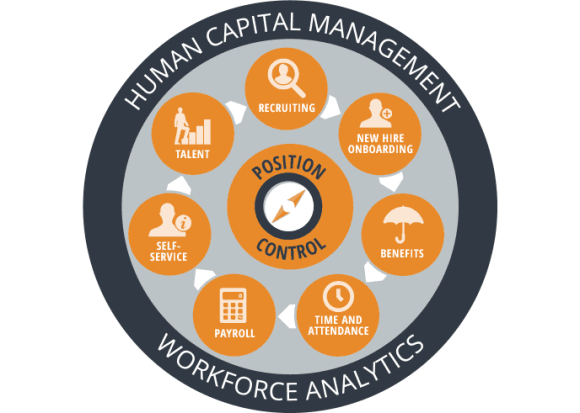
An HCM solution is an integrated system that automates HR functions combined with finance, planning, and analytics and allows for employee self-service capabilities, thereby reducing labor costs, optimizing business processes, and increasing efficiency. Companies that transition from manual processes and disparate legacy systems to modern, cohesive digital workforce management technologies can realize up to 15-25% cost savings related to HR and IT spend.
Most current HCM solutions are offered as a cloud-based, SaaS delivery model and include modules for payroll, HR, time and labor management, and recruitment. This type of solution does not require an expensive hardware investment and constantly updates software to the latest version while maintaining secure backups. These systems are monitored at all times and provide the utmost reliability. An added plus for asset managers is that the solutions can be customized to suit the size of any company and grow as the organization grows.
At FinServ Consulting, we have experience working with firms of various sizes in the alternative asset management industry to select, implement, and/or upgrade their HCM systems. While there are numerous benefits of having one comprehensive, integrated HCM, there are other options available on the market such as lite solutions that meet basic needs without all the added features that may not be necessary for some firms, as well as point solutions that cater to the industry’s unique needs, like complicated compensation structures. FinServ can help assess your company’s specific requirements to identify what to be aware of in terms of missing features, implementation issues, and cost-benefit analysis of different HCM options.
Benefits of a Consolidated HCM
Attract and Grow Talent
Recruiting top talent and keeping them engaged is no longer just HR’s responsibility—talent objectives can have a significant financial impact on growing a financial services business. Implementing a new HCM system can help enhance performance management processes to eliminate bureaucracy and encourage meaningful conversations between managers and employees focused on performance improvement. In addition, better compensation data and visibility of top talent allow managers to make more well-informed decisions regarding performance and rewards.
Some clients in the alternative asset management space that FinServ has previously worked with used manual spreadsheets to manage staff performance, as well as recruiting and other functions in some cases. However, by opting for a consolidated HCM system, these organizations were able to use more sophisticated workflows to provide employees with more meaningful feedback. Also, they could track and monitor operational outcomes and staff development across the company to ensure a payback from their HCM investment.
Make Better Informed Decisions
Asset management firms in the current environment face increasing regulatory scrutiny, such as GDPR, AIFMD, and Form PF, and constantly evolving standards. In order to meet the new generation of demands, these companies need to make well-informed investment decisions with visibility into all business lines. However, this is a difficult task when the data required to deliver these insights is housed in disparate legacy systems with varying formats and level of detail. This is where having consolidated HCM comes in—a single system for finance, HR, planning, and analytics can offer the necessary foundation to gain better insights, save time on data aggregation, and proactively solve business problems. A digital solution of this type can help improve business margins, provide competitive differentiation, attract and retain customers, and identify lucrative areas for growth.
Harness the Power of Modern Data
Today’s financial companies have an unprecedented amount of valuable data across their organization. However, many are still not able to access this data due to isolated, unorganized, and inaccurate legacy systems. The data warehouses that are typically accessed by business intelligence tools to create reports or perform financial analyses hold data that was accurate at the time it was loaded and refreshed from legacy systems, resulting in a high likelihood that it is out-of-date and unreliable. As a result, financial services firms often turn to add-on custom software solutions to try and achieve real-time data extraction, but these products often produce further challenges because they require continuous maintenance to keep up with the changing needs of the business.
Implementing a contemporary, consolidated HCM system allows firms nimble access to the real-time data that is necessary for constantly changing business needs. These solutions include technologies, such as cloud computing, open APIs, artificial intelligence, and machine learning, that make insights transparent and accessible across lines of business.
Build Organizational Agility
Being agile is key to an asset manager’s long-term success and there are several factors at play in building organizational agility:
- Adaptable: A flexible technology foundation is essential to be able to change organizational structures and processes in response to regularly shifting business needs.
- Skilled: Financial services firms, among others, face a widening skill gap and must find ways to upskill their workforce.
- Empowered: In order to perform at the highest potential to meet evolving consumer expectations and drive success, employees need full access to data to make business decisions.
- In Control: The need for measurement and control goes hand in hand with agility and speed. Asset managers must measure more relevant KPIs to learn from what works and what doesn’t when it comes to new digital revenue streams.
There are common obstacles that firms must overcome to meet the guidelines above, including inflexible legacy technologies, bureaucratic organizational culture, and a lack of relevant employee skills. By using a comprehensive HCM solution to add intelligence to business tasks, financial firms can move past these challenges and employ integrated, real-time planning in order to build organizational agility and realize their digital growth aspirations.
Choose the Right Solution
As mentioned previously, there are many HCM offerings available on the market and it is important to select the right one to meet your firm’s unique needs. There are several factors to consider, such as the needs and priorities of the business, size of the firm, and desired metrics and reporting abilities. FinServ Consulting has experience working with asset management firms to identify and implement a suitable HCM solution. We can help you make the right decision and take full advantage of the capabilities and rewards that the new solution will provide.
Summary
If you are interested in establishing or improving your firm’s HCM platform, FinServ Consulting is the right partner to help you reach your firm’s strategic objectives. Throughout our 15 years of existence, we have proven that our deep industry knowledge combined with our project management and overall best practice methodologies can be an asset to your organization. To further continue the conversation or to discuss more of FinServ’s capabilities, please contact us at info@finservconsulting.com or give us a call at (646) 603-3799.
About FinServ Consulting
FinServ Consulting is an independent experienced provider of business consulting, systems development, and integration services to alternative asset managers, global banks and their service providers. Founded in 2005, FinServ delivers customized world-class business and IT consulting services for the front, middle and back office, providing managers with optimal and first-class operating environments to support all investment styles and future asset growth. The FinServ team brings a wealth of experience from working with the largest and most complex asset management firms and global banks in the world.